
AI Is Not Failing. Your Execution Is.

· 6 min read
Shubham Narkhede
DevOps Engineer @ Robert Bosch GmbH

Everyone is talking about AI replacing jobs.

Few people are talking about what happens when companies deploy AI faster than their own systems can actually support it.

That is the real story of 2026.

Over the past year, enterprises across every industry pushed AI adoption with one goal in mind: cut costs, move fast, and automate as aggressively as possible. Executives wanted AI roadmaps. Investors wanted AI narratives. Employees wanted AI tools integrated into daily workflows immediately. And so, organizations that spent years struggling with digital transformation started trying to redesign entire operational systems around generative AI in just a few months.

The pressure was real. The excitement made sense.

But the industry is now entering a second phase of AI adoption, and this phase is exposing something most companies seriously underestimated.
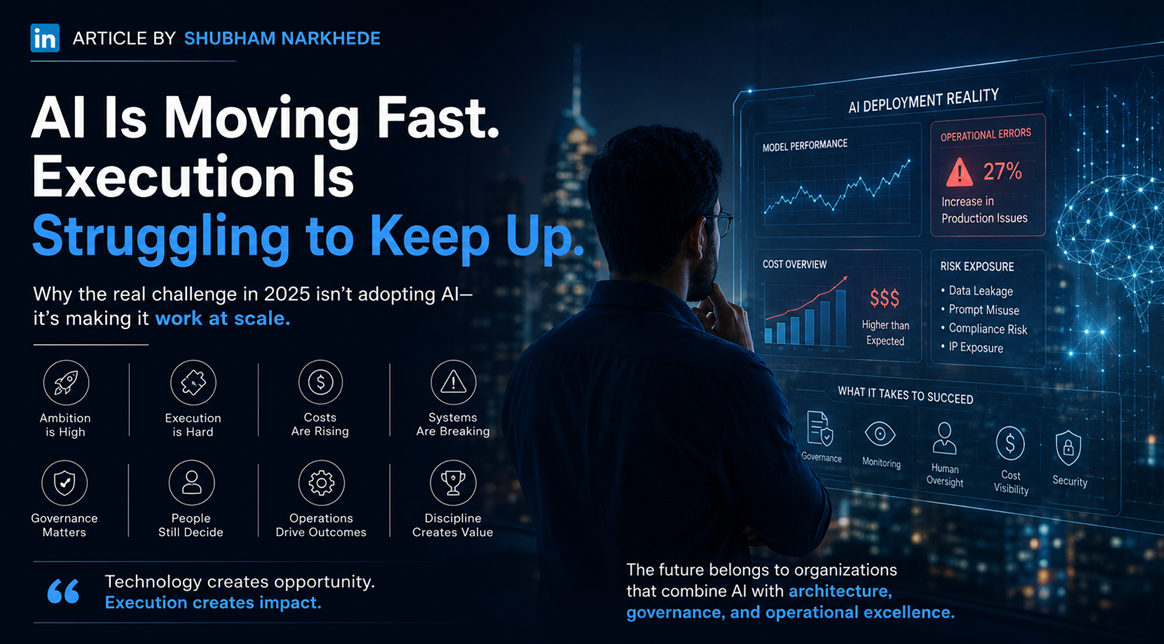
AI Industry Banner

The gap between AI ambition and operational readiness is showing up as real damage.

Companies are deploying models faster than they can govern them. Employees are using AI tools faster than leadership teams can approve them. And the numbers reflect this clearly.

Only about one in four AI initiatives actually deliver their expected ROI. Fewer than 20 percent have been fully scaled across the enterprise. Nearly half of organizations using generative AI have already run into problems, ranging from hallucinated outputs to cybersecurity incidents, privacy exposure, and IP leakage.

The biggest misconception in the AI race is simple: intelligence does not automatically equal reliability.

A model generating impressive outputs in a sandbox does not mean it will operate reliably inside a real business system. Real enterprise environments are not controlled demos. They are messy, unpredictable, and full of edge cases that no demo ever reveals.

Real businesses operate through:

  • Legacy infrastructure that was never designed with AI in mind
  • Fragmented workflows across disconnected teams and systems
  • Compliance requirements that vary by region, industry, and contract
  • Unpredictable human behavior that no simulation accounts for
  • Inconsistent data pipelines feeding inaccurate information into models
  • Operational exceptions that break automation logic daily
  • Security vulnerabilities introduced the moment AI touches production systems
  • Constantly changing business rules that models have no awareness of

The real-world failures are not theoretical. They are already happening.

Finance teams did not anticipate how token-based pricing scales compared to traditional SaaS software costs. The more employees interact with models, the more workflows become AI-dependent, the more automation layers get added, and the harder cost visibility becomes. What looked affordable during pilot testing became a financial operations problem at enterprise scale.

Retail and logistics companies deployed AI-powered automation systems and ran into operational failures they never saw coming: incorrect discounts, inventory mismatches, mislabeling issues, broken fulfillment logic, and workflow conflicts between automated systems and human operations.

Logistics optimization engines performed perfectly in simulations. Then they failed when exposed to unpredictable delivery behavior, regional constraints, human delays, weather conditions, and real-world variables that no simulation modeled accurately.

And even the largest, most well-resourced companies in the world faced this. Walmart, mid-2025, had to completely reshape its agentic AI approach, moving away from multiple disconnected single-purpose agents toward a unified framework, because orchestrating dozens of agents created more operational fragmentation than efficiency.

The issue was never whether the model was intelligent. The issue was whether the surrounding system was mature enough to support it.
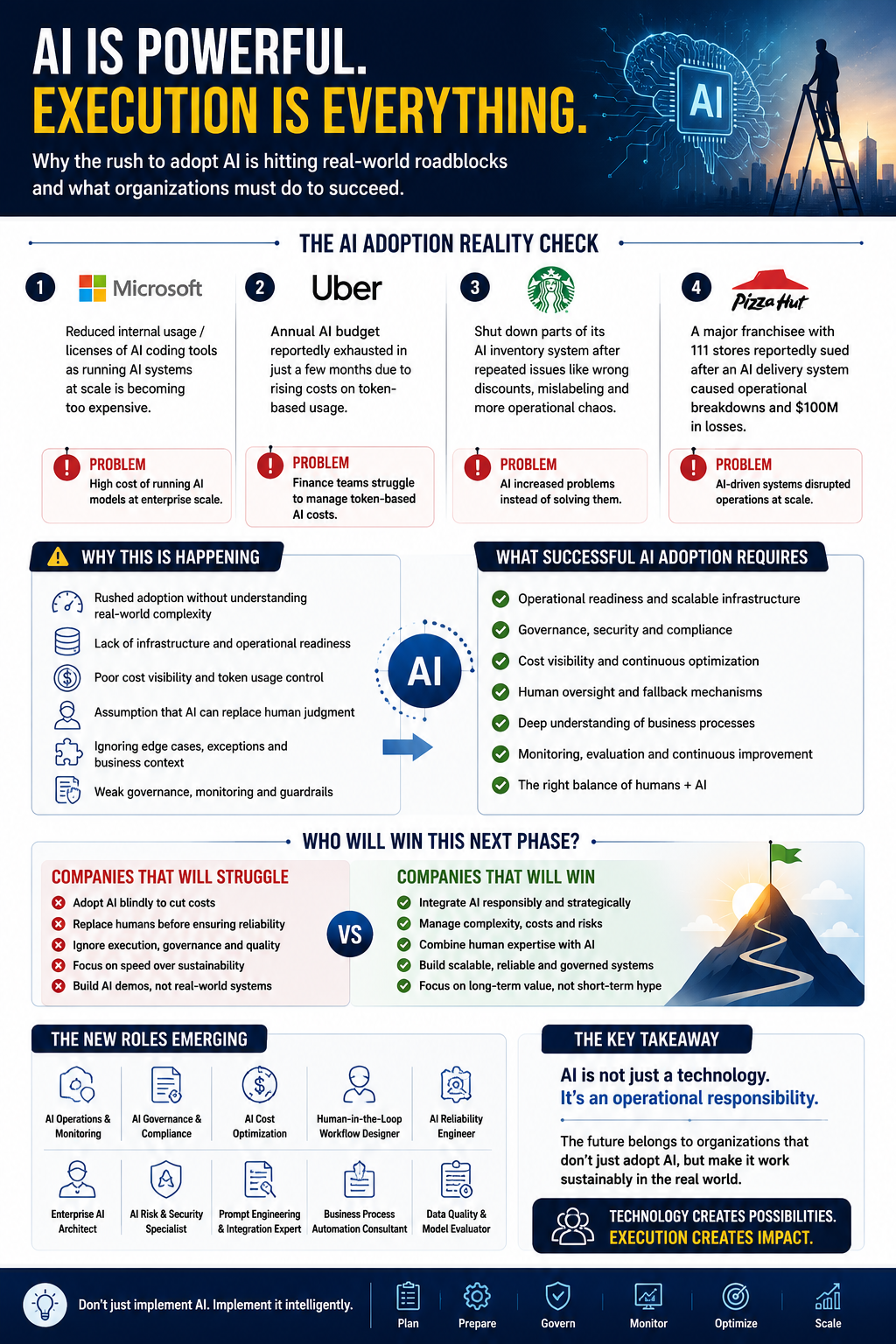
Understanding the Operational Need of AI in Industry

Sustainable AI adoption requires far more than plugging a model into your organization.

It requires:

  • Operational readiness established before deployment, not after
  • Governance frameworks that match your actual risk profile
  • Monitoring systems that catch failures before customers do
  • Infrastructure built for scale, not for pilots
  • Cost visibility so finance teams are not blindsided mid-quarter
  • Human oversight at every decision point that carries real consequence
  • Fallback mechanisms for when the model gets it wrong
  • Security controls that cover your actual exposure surface, not a theoretical one
  • Deep understanding of your specific business processes and where AI breaks them

This work is not glamorous. It does not generate viral demos or impressive press releases. But it is the difference between experimentation and sustainable adoption.

The internal risk conversation is still massively underestimated.

The riskiest AI behaviors in 2025 are not external threats. They are internal.

Employees are already uploading sensitive files into public AI tools. Teams are using unauthorized AI applications that sit entirely outside governance policies. Confidential prompts are leaking intellectual property. AI-generated outputs are introducing hallucinated information into real business workflows.

Most of this is not malicious. It is employees trying to work faster and stay productive. But speed without governance creates exposure. And many organizations were completely unprepared for how fast shadow AI usage would spread internally once employees realized how powerful these tools could be.

Between 2023 and 2024, the amount of corporate data being uploaded into AI tools rose by 485 percent. From 2024 to 2025, employee data flowing into generative AI services grew more than 30 times. That is not a slow, manageable shift. That is an exposure surface expanding faster than most security teams can track.

The conversation in the industry is shifting. And it is shifting in an important direction.

Not from "AI will replace everyone" to "AI is failing."

It is shifting from "How fast can we adopt AI?" to "How do we make AI work reliably at scale?"

That shift is already creating entirely new categories of technical work that barely existed two years ago:

  • AI operations and monitoring
  • AI governance and compliance
  • AI reliability engineering
  • AI cost optimization
  • AI security and auditing
  • Enterprise AI architecture
  • Human-in-the-loop workflow design
  • AI infrastructure optimization
  • Business-process-aware automation consulting

Ironically, while most people debate whether AI will eliminate jobs, AI is simultaneously creating entirely new technical disciplines. The market is not simply replacing expertise. It is redefining where expertise matters most.

Preparation beats speed. Every time.

The UAE invested in AI infrastructure and governance starting in 2017, five years before generative AI entered the mainstream. By 2025, AI trust there registered around 67 percent, compared to 32 percent in the US. That gap did not come from better models. It came from better preparation and longer institutional commitment to getting the foundations right before scaling fast.

I work at the intersection of full-stack engineering, DevOps, and system architecture. From this position, one thing is clear.

The organizations that will come out ahead are not the ones moving fastest. They are the ones combining technical execution with operational discipline. They are treating AI the way experienced engineers treat infrastructure: with monitoring, fallback mechanisms, governance layers, observability, and deep integration into actual business context.

The Three Waves of AI

The first wave of AI was about possibility.

The second wave is about sustainability.

The third wave will be about operational maturity.

The winners will not be the companies with the loudest AI announcements or the fastest deployment timelines.

They will be the companies with the strongest execution.

Speed gets you to production. Discipline keeps you there.

The Automotive Industry in 2026: Survival, Consolidation, and Transformation

· 11 min read
Shubham Narkhede
DevOps Engineer @ Robert Bosch GmbH

Two Years Later: Reflections on Transformation

In January 2024, I wrote about the automotive industry's reckoning. I described it as a structural transformation, not a temporary downturn. Two years later, that prediction has proven accurate, though the reality has been more complex and more consequential than I anticipated.

The automotive industry hasn't collapsed. But it has fundamentally changed. Companies that adapted quickly have emerged stronger. Those that didn't have struggled or disappeared. Bosch, as one of the world's largest automotive suppliers, has navigated this transition, though not without pain.

As I reflect on the past two years, I want to share what I've learned about how large enterprises survive and thrive during periods of disruption.

The Industry in 2026: A Snapshot

Let me paint a picture of the automotive industry in 2026:

EV Adoption Has Plateaued: The narrative of "EVs will save the industry" has given way to a more nuanced reality. EVs now represent 35-40% of new vehicle sales in Europe, up from 25% in 2024. But growth has slowed. Battery costs have plateaued, and consumer adoption has hit a ceiling in many markets. The transition to EVs is happening, but more slowly than the optimistic projections of 2023-2024.

Traditional Powertrains Are Declining: Internal combustion engines still dominate, but their market share is shrinking. Hybrid vehicles have become the sweet spot for many consumers—offering better efficiency than pure ICE vehicles while avoiding the cost and range anxiety of pure EVs.

Supply Chain Consolidation: The global supply chain has consolidated. Smaller suppliers that couldn't adapt to the new environment have been acquired or have gone out of business. Larger suppliers like Bosch have emerged stronger, but with reduced margins and increased pressure to innovate.

Software and Services Are Growing: The growth in the automotive industry is no longer in hardware—it's in software and services. Connected car services, autonomous driving capabilities, and over-the-air updates are becoming standard. Companies that can build software at scale have a competitive advantage.

Geopolitical Fragmentation: The automotive industry is becoming more fragmented geographically. China has become a dominant player in EVs and batteries. The US and EU are implementing protectionist policies to support domestic manufacturers. Global supply chains are being replaced by regional supply chains.

Bosch's Journey: Adaptation and Resilience

Bosch entered 2024 as a company in transition. The company had been investing heavily in electrification and software, but these investments hadn't yet generated significant revenue. The company's traditional business—fuel injection systems, transmissions, and other ICE components—was in managed decline.

By 2026, Bosch has successfully navigated this transition:

Portfolio Transformation: The company has divested or scaled back several traditional business units. The fuel injection business, which represented 5-10% of revenue in 2023, now represents less than 2%. Meanwhile, the company's software and services business has grown to represent 15-20% of revenue.

Geographic Expansion: Bosch has expanded its presence in Asia, particularly in China and India, where EV adoption is accelerating. The company has also strengthened its position in the US market.

Technology Investments: The company has invested heavily in AI, autonomous driving, and battery management systems. These investments are starting to pay off, with several new products and services launched in 2025-2026.

Organizational Restructuring: The company has reorganized to be more agile and responsive to market changes. Traditional hierarchical structures have been flattened. Cross-functional teams have been empowered to make decisions faster.

The Infrastructure Transformation: From Foundation to Optimization

The infrastructure transformation that began in 2022 has reached a new phase. The foundation we built in 2022-2024 is now mature and stable. In 2025-2026, the focus has shifted to optimization and innovation.

Kubernetes at Scale: We now operate Kubernetes clusters across multiple regions and cloud providers, running thousands of containerized applications. The infrastructure is highly automated, with self-healing capabilities and intelligent resource allocation.

AI-Driven Operations: The infrastructure itself is now AI-driven. Machine learning models predict resource demand, optimize resource allocation, and identify potential issues before they occur. This has reduced operational overhead by 40% compared to 2024.

Multi-Cloud Strategy: We've implemented a true multi-cloud strategy, with applications running on AWS, Azure, and Google Cloud, as well as on-premises data centers. This reduces vendor lock-in and enables us to take advantage of the best services from each provider.

Edge Computing: We've deployed edge computing infrastructure at manufacturing facilities and distribution centers. This enables real-time decision-making without relying on centralized servers.

The AI Revolution: From Experimentation to Production

In 2024, AI was still largely experimental at Bosch. By 2026, AI has become embedded in core business processes:

Generative AI in Product Development: We're using generative AI to accelerate product development. AI models can generate design variations, optimize components for manufacturability, and predict product performance. This has reduced product development cycles by 30%.

Autonomous Manufacturing: Manufacturing facilities are increasingly autonomous. AI-driven robots can adapt to changing production requirements. Quality control is performed by AI vision systems. Predictive maintenance prevents equipment failures before they occur.

Intelligent Supply Chain: The supply chain is now intelligent and self-optimizing. AI models predict demand, optimize inventory, and recommend procurement strategies. The supply chain can adapt to disruptions in real-time.

Customer Intelligence: We're using AI to understand customer behavior and preferences. This enables personalized marketing, predictive customer service, and new revenue streams through data-driven services.

The Workforce Transformation

The expansion of AI and automation has had significant implications for the workforce. At Bosch, we've been proactive about managing this transition:

Job Displacement: Some roles have been eliminated or significantly reduced. Routine tasks like data entry, invoice processing, and basic customer service have been automated. Estimates suggest that 10-15% of routine administrative jobs have been eliminated.

Job Creation: New roles have been created. AI trainers, AI auditors, AI product managers, and data scientists are in high demand. The company has invested in training programs to help employees transition to these new roles.

Reskilling Success: Of the employees who participated in reskilling programs, 75% successfully transitioned to new roles. 15% chose to take early retirement or severance. 10% left the company to pursue other opportunities.

Wage Impact: On average, employees who transitioned to AI-related roles saw a 15-20% increase in compensation. However, this varies by role and location. In some cases, employees in routine roles that were automated saw reduced opportunities and stagnant wages.

Lessons Learned: What It Takes to Survive Disruption

Looking back on the past two years, several lessons stand out:

Leadership Clarity: Companies that survived disruption had clear leadership that articulated a vision and committed to it. Bosch's leadership was clear about the need to transform, and this clarity cascaded through the organization.

Willingness to Divest: Companies that tried to maintain their traditional business while building new businesses struggled. Bosch was willing to divest or scale back traditional business units to fund new investments.

Investment in Infrastructure: The infrastructure investments we made in 2022-2024 proved crucial. Without modern infrastructure, it would have been difficult to scale AI and automation.

Talent Management: Companies that invested in reskilling and change management managed the workforce transition more successfully. Bosch's investment in employee development paid dividends.

Agility: The ability to adapt quickly to changing market conditions was critical. Companies with rigid organizational structures struggled. Bosch's willingness to reorganize and empower cross-functional teams enabled faster adaptation.

Customer Focus: Throughout the transformation, Bosch maintained a focus on customer needs. This ensured that new products and services were relevant to the market.

The Remaining Challenges

Despite the progress, significant challenges remain:

Profitability: The automotive industry's margins have compressed. Bosch's profit margins in 2026 are lower than in 2023. The company is investing heavily in new technologies, which limits profitability in the short term.

Competition: Chinese competitors are emerging as serious threats. Companies like BYD and NIO are investing heavily in EVs and autonomous driving. They have lower cost structures and are willing to accept lower margins to gain market share.

Regulatory Uncertainty: Regulations around autonomous driving, data privacy, and AI governance are still evolving. Companies need to navigate this uncertainty while building products that will be compliant with future regulations.

Talent Shortage: Skilled engineers in AI, software, and autonomous driving are in high demand. Bosch competes with tech companies like Google, Amazon, and Tesla for talent. Retaining top talent is an ongoing challenge.

Looking Ahead: 2026 and Beyond

As we move into the second half of 2026 and beyond, several trends are emerging:

Autonomous Driving: Level 3 and Level 4 autonomous driving systems are becoming more common. This will have profound implications for the automotive industry and society as a whole.

Vehicle-as-a-Service: Ownership of vehicles is declining, particularly in urban areas. Vehicle-as-a-service models are becoming more prevalent. This changes the business model for automotive suppliers.

Sustainability: Environmental regulations are becoming more stringent. Companies need to not just build electric vehicles, but also ensure that the entire supply chain is sustainable.

Data Monetization: Connected vehicles generate vast amounts of data. Companies are exploring ways to monetize this data through services and analytics.

A Personal Reflection

Working at Bosch during this period of transformation has been one of the most challenging and rewarding experiences of my career. I've had the opportunity to work on infrastructure that impacts thousands of engineers and millions of customers. I've seen firsthand how large enterprises can adapt to disruption.

But I've also seen the human cost of transformation. Colleagues have lost jobs. Teams have been reorganized. Uncertainty has been a constant. The company has handled this with professionalism and compassion, but the impact on individuals has been real.

As I look toward the future, I'm optimistic about Bosch's prospects. The company has adapted successfully to the automotive industry's transformation. The infrastructure we've built is world-class. The investments in AI and software are paying off. The workforce is increasingly skilled in new technologies.

But the journey isn't over. The automotive industry will continue to evolve. New competitors will emerge. New technologies will disrupt established business models. Companies that can continue to adapt, innovate, and put customers first will thrive. Those that can't will struggle.

The Broader Context

The automotive industry's transformation is part of a broader trend: the digital transformation of traditional industries. Manufacturing, energy, finance, healthcare—all are undergoing similar transformations. Companies that can navigate these transformations successfully will be the winners of the next decade.

The key is not to resist change, but to embrace it. To invest in infrastructure, talent, and innovation. To be willing to divest from declining business units. To maintain a clear vision while being flexible about the path to get there.

Bosch has done this. The company has emerged from the 2024-2026 period stronger, more agile, and better positioned for the future. It's a testament to the company's leadership, the dedication of its employees, and the power of strategic transformation.


Key Takeaways

  • The automotive industry's transformation is real and structural, not a temporary downturn
  • Companies that adapted quickly and invested in new technologies have emerged stronger
  • Infrastructure investments in cloud, containers, and automation have been crucial
  • AI and automation are transforming business processes and creating new opportunities
  • Workforce transformation requires investment in reskilling and change management
  • Leadership clarity, willingness to divest, and customer focus are critical for surviving disruption

Epilogue: What's Next?

As I write this in April 2026, I'm at an inflection point in my career. I've spent four years at Bosch, working on infrastructure and digital transformation. I've learned an enormous amount and had the opportunity to impact the company's future.

But I'm also aware that the industry is evolving rapidly. New opportunities are emerging in AI, autonomous driving, and sustainable energy. I'm exploring what's next—whether that's continuing at Bosch, joining a startup, or pursuing something entirely different.

One thing is certain: the next chapter of my career will be shaped by the same forces that have shaped the automotive industry—technological disruption, market dynamics, and the need to continuously learn and adapt.

I'll be sharing more about this journey in future posts. For now, I'm grateful for the opportunity to have been part of Bosch's transformation and excited about what comes next.


Thank you for reading this series of posts on the automotive industry's transformation, AI in enterprise, and the future of work. I'd love to hear your thoughts and experiences. Feel free to reach out via LinkedIn or email.

AI-Powered Project and Product Management: From Planning to Execution

· 10 min read
Shubham Narkhede
DevOps Engineer @ Robert Bosch GmbH

The Project Management Challenge

Project management is about coordinating people, resources, and work to deliver value. It's complex, multifaceted, and requires juggling numerous tasks simultaneously. Traditionally, project managers rely on experience, intuition, and tools like JIRA and Excel.

But AI is changing project management. By integrating AI into project management workflows, I've been able to plan better, make better decisions, and deliver projects more effectively.

AI in Project Planning

Project planning is where AI adds the most value. When planning a project, I use AI to:

Define Scope: I use Claude to help me clearly define project scope. By describing the project goals and constraints, Claude helps me identify what should and shouldn't be included.

Identify Risks: I use Claude to help me identify potential risks. Claude's systematic approach helps me think through risks I might have missed.

Develop Timeline: I use Claude to help me develop realistic timelines. By providing information about task dependencies and team capacity, Claude helps me estimate timelines.

Resource Planning: I use Claude to help me plan resource allocation. Claude helps me think through resource requirements and identify potential bottlenecks.

Stakeholder Analysis: I use Claude to help me identify stakeholders and develop communication strategies.

Success Metrics: I use Claude to help me define success metrics and KPIs.

The result is more comprehensive project plans that account for more factors and are more likely to succeed.

AI in Risk Management

Risk management is critical to project success. I use AI to:

Identify Risks: I use Claude to systematically identify risks. Claude's structured approach helps me think through different categories of risks.

Assess Risk: I use Claude to help me assess the probability and impact of risks.

Develop Mitigation Strategies: I use Claude to help me develop mitigation strategies for identified risks.

Monitor Risks: I use Claude to help me develop monitoring strategies for risks.

Respond to Issues: When issues arise, I use Claude to help me think through response strategies.

This systematic approach to risk management has helped me avoid or mitigate many potential problems.

AI in Team Management

Managing a team is about understanding people, motivating them, and removing blockers. I use AI to:

One-on-One Preparation: Before one-on-ones, I use Claude to help me prepare. Claude helps me think through key topics and how to approach them.

Performance Feedback: When providing feedback, I use Claude to help me structure feedback in a way that's constructive and motivating.

Conflict Resolution: When conflicts arise, I use Claude to help me think through different approaches to resolution.

Team Development: I use Claude to help me identify skill gaps and develop training plans.

Motivation Strategies: I use Claude to help me think through strategies for motivating the team.

AI in Decision-Making

Project managers make numerous decisions. I use AI to:

Define Decision Criteria: I use Claude to help me define criteria for making decisions.

Generate Alternatives: I use Claude to help me generate alternative approaches to problems.

Evaluate Alternatives: I use Claude to help me evaluate alternatives based on defined criteria.

Identify Trade-offs: I use Claude to help me identify trade-offs between alternatives.

Make Recommendations: I use Claude to help me synthesize analysis and make recommendations.

This structured approach to decision-making has improved the quality of my decisions.

AI in Status Reporting

Status reporting is a critical communication tool. I use AI to:

Summarize Progress: I use Claude to help me summarize progress in a clear, concise way.

Highlight Achievements: I use Claude to help me identify and highlight key achievements.

Identify Issues: I use Claude to help me clearly articulate issues and their impact.

Develop Action Plans: I use Claude to help me develop action plans to address issues.

Communicate Effectively: I use Claude to help me craft communications that resonate with different audiences.

Better status reports lead to better stakeholder communication and management.

Product Management with AI

Beyond project management, I've integrated AI into product management. Product management is about understanding customers, defining strategy, and driving product development. I use AI to:

Customer Research: I use Gemini to research customer needs, pain points, and preferences. Gemini's access to current information helps me understand market trends.

Competitive Analysis: I use Gemini to analyze competitors and their offerings. This helps me understand the competitive landscape.

Product Strategy: I use Claude to help me develop product strategy. Claude's reasoning capabilities help me think through strategic decisions.

Roadmap Planning: I use Claude to help me develop product roadmaps. Claude helps me think through sequencing and prioritization.

User Story Development: I use Claude to help me develop user stories. Claude helps me write clear, comprehensive user stories.

Acceptance Criteria: I use Claude to help me develop acceptance criteria. Claude ensures criteria are clear and testable.

Feature Prioritization: I use Claude to help me prioritize features. Claude's structured approach helps me think through prioritization criteria.

Launch Planning: I use Claude to help me plan product launches. Claude helps me think through all the elements of a successful launch.

AI-Powered JIRA Workflow

I've integrated AI into my JIRA workflow to make it more efficient:

Epic Creation: When creating epics, I use Claude to help me write clear, comprehensive epic descriptions.

Story Breakdown: When breaking down epics into stories, I use Claude to help me identify stories and structure them logically.

Story Writing: When writing stories, I use Claude to help me write clear user stories with acceptance criteria.

Sprint Planning: During sprint planning, I use Claude to help me estimate story points and plan sprints.

Sprint Reviews: During sprint reviews, I use Claude to help me synthesize progress and prepare communications.

Retrospectives: During retrospectives, I use Claude to help me synthesize feedback and identify improvements.

Specific Use Cases

Let me share some specific examples of how I've used AI in project and product management:

Example 1: Launching a New Product Feature

I was launching a new feature for a product. I used AI to:

  1. Define Scope: Used Claude to clearly define what the feature would include and what it wouldn't.

  2. Identify Risks: Used Claude to identify potential risks (technical, market, organizational).

  3. Develop Timeline: Used Claude to develop a realistic timeline accounting for dependencies.

  4. Plan Launch: Used Claude to develop a comprehensive launch plan including marketing, support, and communication.

  5. Develop Success Metrics: Used Claude to define metrics to measure feature success.

The result was a well-planned launch that went smoothly with minimal issues.

Example 2: Managing a Complex Project

I was managing a complex infrastructure project with multiple teams and dependencies. I used AI to:

  1. Identify Risks: Used Claude to identify risks across technical, organizational, and external dimensions.

  2. Develop Mitigation Strategies: Used Claude to develop mitigation strategies for identified risks.

  3. Plan Communication: Used Claude to develop a communication plan for different stakeholders.

  4. Monitor Progress: Used Claude to help me develop monitoring strategies and metrics.

  5. Manage Issues: When issues arose, used Claude to help me think through response strategies.

The project was delivered on time and within budget, with good stakeholder satisfaction.

Example 3: Product Strategy Development

I was developing strategy for a product line. I used AI to:

  1. Research Market: Used Gemini to research market trends and customer needs.

  2. Analyze Competitors: Used Gemini to analyze competitors and their strategies.

  3. Develop Strategy: Used Claude to synthesize research and develop product strategy.

  4. Develop Roadmap: Used Claude to develop a product roadmap aligned with strategy.

  5. Communicate Strategy: Used Claude to develop communications explaining strategy to stakeholders.

The strategy was well-received and provided clear direction for the product team.

The Impact on Project Success

Integrating AI into project and product management has had significant impact:

Better Planning: Projects are better planned, with more comprehensive risk identification and mitigation.

Better Decision-Making: Decisions are more systematic and consider more factors.

Better Communication: Communications are clearer and more effective.

Better Outcomes: Projects are more likely to be delivered on time, within budget, and meeting objectives.

Reduced Stress: By handling routine tasks and providing structured thinking, AI reduces the stress of project management.

Challenges and Lessons Learned

Integrating AI into project and product management hasn't been without challenges:

Over-Reliance: Early on, I was tempted to rely too heavily on AI. I learned that AI is a tool to augment judgment, not replace it.

Time Investment: Using AI requires time to craft prompts and review outputs. This needs to be balanced against time savings.

Team Adoption: Getting the team to adopt AI-powered processes requires change management and training.

Tool Integration: Integrating AI into existing tools and workflows requires thought and effort.

Best Practices for AI-Powered Project Management

Based on my experience, here are best practices:

Use AI for Thinking, Not Deciding: Use AI to help you think through problems, not to make decisions for you.

Combine AI with Experience: Combine AI insights with your experience and judgment.

Validate AI Outputs: Always validate AI outputs and be prepared to reject or significantly revise them.

Involve the Team: Involve the team in AI-powered processes. Get their input and feedback.

Measure Impact: Measure the impact of AI on project outcomes. This helps you identify what works.

Iterate: Your AI-powered processes will evolve. Continuously iterate and improve.

The Future of AI in Project Management

As AI evolves, I expect project management to evolve:

Predictive Analytics: AI will be used to predict project risks and outcomes more accurately.

Automated Planning: More of the planning process might be automated, with AI generating initial plans that humans refine.

Real-Time Insights: AI will provide real-time insights into project status and risks.

Autonomous Project Management: For routine projects, more of the project management might be automated.

Integration with Tools: AI will be more deeply integrated into project management tools like JIRA.

Conclusion

AI has transformed how I approach project and product management. By integrating AI into planning, decision-making, and communication, I've been able to manage more complex projects more effectively.

If you're a project or product manager, I encourage you to experiment with AI. Start with one or two use cases and expand from there. The productivity and quality improvements are significant.


Key Takeaways

  • AI can be integrated into project planning, risk management, team management, and decision-making
  • AI helps with defining scope, identifying risks, developing timelines, and planning resources
  • In product management, AI helps with customer research, competitive analysis, strategy development, and roadmap planning
  • AI improves project outcomes by enabling better planning, decision-making, and communication
  • Best practices include using AI for thinking (not deciding), combining with experience, and validating outputs
  • Challenges include over-reliance, time investment, and team adoption
  • The future will see more predictive analytics, automated planning, and real-time insights

In the next post, I'll share my overall lessons learned and thoughts on the future of AI mastery.

AI Certifications and My Learning Journey: From Fundamentals to Mastery

· 8 min read
Shubham Narkhede
DevOps Engineer @ Robert Bosch GmbH

Why Certifications Matter

When I started my AI journey, I could have simply experimented with tools and learned through trial and error. But I realized that structured learning would accelerate my progress and help me understand the fundamentals more deeply.

Certifications serve multiple purposes. They provide structured learning, validate my knowledge, and demonstrate my expertise to others. Over the past two years, I've pursued several certifications to deepen my AI knowledge.

My Certification Journey

Here's a chronological overview of the certifications I've pursued:

Early 2024: LinkedIn Learning - Generative AI Fundamentals

Mid 2024: Coursera - Google's Generative AI for Everyone

Late 2024: Google Cloud - Generative AI Fundamentals

Early 2025: DeepLearning.AI - Prompt Engineering for LLMs

Mid 2025: Microsoft - AI Fundamentals

Late 2025: Anthropic - Claude Mastery (self-study based on documentation)

LinkedIn Learning - Generative AI Fundamentals

My first formal learning was through LinkedIn Learning. The "Generative AI Fundamentals" course provided a broad overview of generative AI:

What I Learned:

  • History and evolution of AI
  • How generative AI models work at a high level
  • Different types of generative AI (text, image, audio, video)
  • Applications of generative AI in business
  • Ethical considerations and responsible AI

Value: This course provided a solid foundation and helped me understand the landscape of generative AI. It was a good starting point for someone new to the field.

Time Investment: 6-8 hours

Cost: Included in LinkedIn Learning subscription

Recommendation: Good for beginners who want a broad overview.

Coursera - Google's Generative AI for Everyone

After the LinkedIn Learning course, I took Google's "Generative AI for Everyone" course on Coursera. This course was more comprehensive and practical:

What I Learned:

  • How generative AI models are trained
  • Prompt engineering basics
  • How to use generative AI tools effectively
  • Practical applications in business
  • Ethical considerations

Value: This course provided more depth than the LinkedIn course and included practical exercises. It helped me understand how to use generative AI tools effectively.

Time Investment: 15-20 hours

Cost: Free (audit option) or $39 (certificate option)

Recommendation: Excellent course for anyone wanting to understand generative AI fundamentals and learn practical skills.

Google Cloud - Generative AI Fundamentals

After the Coursera course, I pursued Google Cloud's "Generative AI Fundamentals" certification. This course was more technical and focused on Google's AI services:

What I Learned:

  • Google Cloud AI services and products
  • How to use Vertex AI for generative AI tasks
  • Prompt engineering with Google's models
  • Best practices for deploying generative AI
  • Security and compliance considerations

Value: This course provided insights into Google's approach to AI and how to use Google Cloud services. It was valuable for understanding enterprise AI deployment.

Time Investment: 20-25 hours

Cost: Free (self-paced learning) with optional exam ($200)

Recommendation: Good for those interested in Google Cloud or enterprise AI deployment.

DeepLearning.AI - Prompt Engineering for LLMs

One of the most valuable certifications I pursued was DeepLearning.AI's "Prompt Engineering for LLMs" course. This course focused specifically on prompt engineering:

What I Learned:

  • Prompt engineering principles and techniques
  • How to structure prompts for different tasks
  • Advanced prompting techniques (chain-of-thought, few-shot, etc.)
  • Common mistakes and how to avoid them
  • Practical exercises with real AI models

Value: This course significantly improved my prompt engineering skills. The practical exercises were particularly valuable.

Time Investment: 10-15 hours

Cost: Free

Recommendation: Essential for anyone serious about mastering generative AI. The practical focus is excellent.

Microsoft - AI Fundamentals

I pursued Microsoft's "AI Fundamentals" certification to understand Microsoft's approach to AI:

What I Learned:

  • Microsoft's AI strategy and services
  • Azure AI services and products
  • How to use Copilot and other Microsoft AI tools
  • Responsible AI principles
  • Practical applications of AI

Value: This course provided insights into Microsoft's AI ecosystem and how to use Azure AI services. It was valuable for understanding enterprise AI.

Time Investment: 15-20 hours

Cost: Free (self-paced learning) with optional exam ($99)

Recommendation: Good for those using Microsoft tools or interested in Azure AI services.

Self-Study - Anthropic and Claude Mastery

Beyond formal certifications, I've done extensive self-study on Claude and Anthropic's approach to AI:

What I Learned:

  • Claude's capabilities and limitations
  • Best practices for using Claude
  • Anthropic's approach to responsible AI
  • Advanced techniques for getting the best from Claude

Value: This self-study has been invaluable for mastering Claude, which is my primary tool for reasoning and writing tasks.

Time Investment: 20-30 hours

Cost: Free (documentation and blogs)

Recommendation: Essential for anyone serious about using Claude effectively.

The Learning Path I'd Recommend

Based on my experience, here's the learning path I'd recommend for someone starting their AI journey:

Phase 1: Fundamentals (1-2 months)

  • LinkedIn Learning - Generative AI Fundamentals
  • Coursera - Google's Generative AI for Everyone
  • Goal: Understand what generative AI is and how it works

Phase 2: Practical Skills (1-2 months)

  • DeepLearning.AI - Prompt Engineering for LLMs
  • Hands-on experimentation with different AI tools
  • Goal: Learn how to use generative AI tools effectively

Phase 3: Specialization (2-3 months)

  • Choose a specialization based on your needs:
    • Google Cloud - Generative AI Fundamentals (for Google Cloud)
    • Microsoft - AI Fundamentals (for Microsoft/Azure)
    • Anthropic documentation (for Claude)
    • OpenAI documentation (for GPT models)
  • Goal: Deep expertise in your chosen platform or tool

Phase 4: Advanced Topics (ongoing)

  • Advanced prompt engineering
  • Integrating AI into workflows
  • Ethical AI and responsible practices
  • Staying current with new models and capabilities

Beyond Certifications: Continuous Learning

While certifications are valuable, the most important learning has come from hands-on experimentation and continuous learning:

Experimentation: I spend time experimenting with new tools and techniques. This hands-on learning is invaluable.

Reading: I regularly read articles, blog posts, and research papers about AI. This helps me stay current with developments.

Community: I participate in AI communities and forums. Learning from others' experiences is valuable.

Building: I build projects that use AI. This practical experience is the best teacher.

Reflection: I regularly reflect on what I've learned and how I can apply it to my work.

The Cost-Benefit Analysis of Certifications

Are certifications worth the time and money investment?

Time: Most certifications take 10-25 hours. This is a significant investment, but the knowledge gained is valuable.

Money: Most certifications are free or low-cost ($39-$200). The ROI is high.

Career Impact: Certifications can help with career advancement and demonstrate expertise to employers.

Practical Value: The practical skills learned from certifications are immediately applicable to work.

My assessment: Certifications are worth the investment, especially the free ones. I'd prioritize:

  1. DeepLearning.AI - Prompt Engineering (free, high practical value)
  2. Coursera - Google's Generative AI for Everyone (free or $39, comprehensive)
  3. Google Cloud or Microsoft certifications (if you use those platforms)

Lessons Learned from My Certification Journey

Over my certification journey, I've learned several lessons:

Structured Learning is Valuable: While experimentation is important, structured learning helps you understand fundamentals and best practices.

Practical Exercises Matter: Certifications with practical exercises are more valuable than those that are purely theoretical.

Specialization is Important: After learning fundamentals, specializing in specific tools or platforms is valuable.

Continuous Learning is Essential: The AI landscape evolves rapidly. Certifications are a starting point, not an endpoint.

Community Learning is Valuable: Learning from others' experiences and sharing your own is as valuable as formal certifications.

Staying Current with AI

The AI landscape evolves rapidly. Here's how I stay current:

Following AI News: I follow AI news sources like The Batch, Import AI, and others to stay updated on new developments.

Reading Research Papers: I read research papers on arXiv to understand cutting-edge developments.

Experimenting with New Tools: When new AI tools or models are released, I experiment with them.

Participating in Communities: I participate in AI communities and forums to learn from others.

Taking Short Courses: When new topics emerge, I take short courses to learn about them.

The Future of AI Learning

As AI evolves, I expect learning approaches to evolve:

More Specialized Certifications: We'll likely see more specialized certifications for specific domains and use cases.

Hands-On Learning: There will be more emphasis on practical, hands-on learning rather than theoretical knowledge.

Continuous Learning: As AI evolves rapidly, continuous learning will become essential.

Community-Based Learning: Community-based learning will become more important as people share experiences and best practices.

AI-Assisted Learning: AI itself will be used to personalize and accelerate learning.

Conclusion

My certification journey has been valuable. While certifications alone don't make you an expert, they provide structure, validate knowledge, and accelerate learning. Combined with hands-on experimentation and continuous learning, certifications are an important part of mastering generative AI.

If you're starting your AI journey, I recommend pursuing certifications, but don't stop there. Combine certifications with hands-on experimentation, continuous learning, and community engagement. That combination will accelerate your progress and help you truly master generative AI.


Key Takeaways

  • Certifications provide structured learning and validate knowledge
  • Recommended certifications: DeepLearning.AI Prompt Engineering, Coursera Generative AI, Google Cloud/Microsoft AI Fundamentals
  • A phased learning approach (fundamentals → practical skills → specialization → advanced) is effective
  • Hands-on experimentation and continuous learning are as important as certifications
  • Staying current with AI developments requires following news, reading papers, and experimenting with new tools
  • The cost-benefit analysis strongly favors pursuing certifications, especially free ones
  • Certifications are a starting point, not an endpoint, for mastering AI

In the next post, I'll explore how I've integrated AI into project management and product management roles.

Mastering Prompt Engineering: The Art and Science of Getting the Best from AI

· 9 min read
Shubham Narkhede
DevOps Engineer @ Robert Bosch GmbH

The Difference Between Good and Great AI Outputs

I've learned that the difference between mediocre AI outputs and exceptional ones often comes down to one thing: the quality of the prompt. A poorly crafted prompt might produce a vague, generic response. A well-crafted prompt produces exactly what you need.

Prompt engineering is the skill of crafting prompts that elicit the best possible responses from AI models. It's part art, part science, and it's perhaps the most important skill for mastering AI.

What is Prompt Engineering?

Prompt engineering is the practice of designing and refining prompts to get the best possible outputs from AI models. It involves understanding how AI models work, what information they need, and how to structure prompts to guide them toward the desired output.

Good prompt engineering can:

  • Significantly improve the quality of AI outputs
  • Reduce the need for iteration and refinement
  • Enable AI to handle more complex tasks
  • Improve consistency across multiple uses
  • Reduce hallucinations and errors

The Fundamentals of Prompt Engineering

Over time, I've developed a set of principles for effective prompt engineering:

Clarity: The clearer your prompt, the better the output. Vague prompts produce vague outputs. Be specific about what you want.

Context: Provide relevant context. The more context the AI has, the better it can understand your needs and produce relevant outputs.

Constraints: Specify constraints and requirements. For example, if you want a response in a specific format, say so.

Examples: Providing examples of what you're looking for helps the AI understand your needs. Few-shot prompting (providing examples) is often more effective than zero-shot prompting (no examples).

Structure: Ask for structured outputs. Instead of asking for a list, ask for a numbered list or a table. Structured outputs are easier to parse and use.

Iteration: Rarely do you get the perfect output on the first try. Be prepared to iterate and refine your prompt based on the output.

Prompt Engineering Techniques

I've learned several techniques that improve prompt quality:

Role-Based Prompting: Start by assigning a role to the AI. For example, "You are an expert software architect" or "You are a marketing strategist." This helps the AI adopt the right perspective.

Few-Shot Prompting: Provide examples of what you're looking for. For example, if you want the AI to write in a specific style, provide examples of that style.

Chain-of-Thought Prompting: Ask the AI to explain its reasoning. For example, "Think through this step by step" or "Explain your reasoning." This often produces more accurate and thoughtful outputs.

Constraint-Based Prompting: Specify constraints and requirements. For example, "Write a blog post in 500 words" or "Provide 3 alternatives, each with pros and cons."

Iterative Prompting: Start with a broad prompt, then refine based on the output. Ask follow-up questions to dive deeper.

Structured Output Prompting: Ask for structured outputs. For example, "Provide the response in JSON format" or "Use a table with columns for..."

Negative Prompting: Specify what you don't want. For example, "Don't use technical jargon" or "Avoid marketing speak."

Prompt Engineering for Different Tasks

Different tasks require different prompt engineering approaches:

Writing Tasks: For writing, I use role-based prompting ("You are a technical writer") combined with examples of the desired style. I also specify constraints like length and target audience.

Analysis Tasks: For analysis, I use chain-of-thought prompting to get the AI to explain its reasoning. I also provide relevant context and constraints.

Code Generation: For code, I use role-based prompting ("You are an expert Python developer") combined with constraints about style and best practices. I also provide examples of the desired code style.

Creative Tasks: For creative tasks, I use fewer constraints to allow the AI more freedom. I focus on providing clear direction about the desired outcome.

Problem-Solving: For problem-solving, I use chain-of-thought prompting and ask for multiple approaches. I also ask for pros and cons of each approach.

Examples of Effective Prompts

Let me share some examples of prompts I've refined over time:

Example 1: Writing a Blog Post

Ineffective: "Write a blog post about AI"

Effective: "You are a technical writer with expertise in AI and enterprise software. Write a 1500-word blog post about how to integrate AI into enterprise workflows. The target audience is technical leaders and architects. Include specific examples and practical advice. Structure the post with an introduction, 3-4 main sections, and a conclusion. Use clear, professional language without excessive jargon."

Example 2: Code Generation

Ineffective: "Write a function to process data"

Effective: "You are an expert Python developer. Write a function that processes a list of JSON objects representing customer transactions. The function should filter transactions by date range, calculate totals by category, and return a dictionary with category totals. Use type hints, include error handling, and follow PEP 8 style guidelines. Include docstring with examples."

Example 3: Analysis

Ineffective: "Analyze this market"

Effective: "Analyze the cloud infrastructure market. Think through this step by step: 1) Identify the major players and their market share, 2) Analyze their key strengths and weaknesses, 3) Identify emerging trends, 4) Suggest competitive strategies for a new entrant. Provide your analysis in a structured format with sections for each step."

Prompt Engineering for Different AI Models

Different AI models respond differently to prompts. I've learned to adjust my prompting based on the model:

Claude: Claude responds well to detailed context and chain-of-thought prompting. I often ask Claude to think through problems step by step.

GPT-4: GPT-4 is very capable but sometimes over-explains. I often ask for more concise responses.

Gemini: Gemini responds well to structured prompts and specific constraints. I often ask for structured outputs.

Copilot: Copilot responds well to clear function signatures and comments. The more context I provide through comments, the better the suggestions.

Advanced Prompt Engineering Techniques

Beyond the basics, I've learned some advanced techniques:

Prompt Chaining: Breaking down complex tasks into multiple prompts. For example, first ask the AI to outline a blog post, then ask it to write each section.

Meta-Prompting: Using prompts to generate better prompts. For example, asking the AI to suggest how to improve a prompt.

Adversarial Prompting: Asking the AI to challenge its own outputs. For example, "What are the weaknesses of this approach?"

Conditional Prompting: Using conditional logic in prompts. For example, "If the task is complex, provide multiple approaches. If it's simple, provide a single approach."

Prompt Optimization: Iteratively refining prompts to improve outputs. This involves testing different versions and measuring which produces the best results.

Common Prompt Engineering Mistakes

I've made many mistakes in my prompt engineering journey. Here are the most common ones:

Being Too Vague: Vague prompts produce vague outputs. Be specific about what you want.

Not Providing Enough Context: Without context, the AI can't understand your needs. Provide relevant background information.

Asking for Too Much: Asking the AI to do too much in a single prompt often produces mediocre results. Break complex tasks into multiple prompts.

Not Iterating: Expecting perfect outputs on the first try. Be prepared to iterate and refine.

Ignoring Model Limitations: Each model has limitations. Understanding these limitations helps you craft better prompts.

Not Using Examples: Examples significantly improve prompt quality. Always provide examples when possible.

Forgetting About Constraints: Specifying constraints (length, format, style) significantly improves outputs.

Measuring Prompt Quality

How do you know if a prompt is good? I use several criteria:

Relevance: Does the output address what I asked for?

Quality: Is the output high-quality and well-written?

Consistency: Does the output follow the specified constraints?

Efficiency: Did I get a good output without excessive iteration?

Reusability: Can I reuse this prompt for similar tasks?

I keep a library of effective prompts that I've refined over time. When I encounter a new task, I often start with a similar prompt from my library and adapt it.

Prompt Engineering as a Skill

Prompt engineering is a skill that improves with practice. Here's how I've developed my prompt engineering skills:

Experimentation: I constantly experiment with different prompting techniques and measure the results.

Learning: I read articles and take courses on prompt engineering to learn new techniques.

Documentation: I document effective prompts and the reasoning behind them.

Sharing: I share effective prompts with colleagues and learn from their feedback.

Reflection: After each use, I reflect on what worked and what didn't.

Certifications and Learning

To formalize my prompt engineering knowledge, I've pursued several certifications:

DeepLearning.AI Short Courses: I completed courses on prompt engineering from DeepLearning.AI, which provided structured learning on prompt engineering techniques.

Anthropic Documentation: I studied Anthropic's documentation on prompt engineering for Claude, which provided insights specific to Claude's capabilities.

OpenAI Documentation: I studied OpenAI's documentation on prompt engineering for GPT models.

LinkedIn Learning: I completed courses on prompt engineering and AI best practices.

These certifications have provided structured learning and helped me understand the fundamentals of prompt engineering.

The Future of Prompt Engineering

As AI models improve, the nature of prompt engineering will evolve:

Less Need for Detailed Prompts: As models become more capable, they might require less detailed prompts.

More Specialized Techniques: We'll likely see more specialized prompt engineering techniques for specific domains and tasks.

Automated Prompt Optimization: Tools that automatically optimize prompts might become available.

Prompt Versioning: As prompts become more important, we might see version control systems for prompts.

Prompt Marketplaces: We might see marketplaces where people share and sell effective prompts.

Conclusion

Prompt engineering is perhaps the most important skill for mastering AI. By learning to craft effective prompts, you can significantly improve the quality of AI outputs and unlock new capabilities.

The good news is that prompt engineering is a skill that anyone can learn. It requires practice and experimentation, but the rewards are significant. Better prompts lead to better outputs, which lead to better work and increased productivity.

If you're serious about mastering AI, invest time in developing your prompt engineering skills. It will pay dividends.


Key Takeaways

  • Prompt engineering is the skill of crafting prompts that elicit the best AI outputs
  • Key principles include clarity, context, constraints, examples, and structure
  • Different techniques work for different tasks (role-based, few-shot, chain-of-thought, etc.)
  • Different AI models respond differently to prompts
  • Advanced techniques include prompt chaining, meta-prompting, and adversarial prompting
  • Common mistakes include being too vague, not providing enough context, and not iterating
  • Prompt engineering is a skill that improves with practice and experimentation
  • Certifications and structured learning can accelerate skill development

AI in My Daily Workflow: JIRA, Marketing, Planning, and Documentation

· 10 min read
Shubham Narkhede
DevOps Engineer @ Robert Bosch GmbH

Beyond the Obvious

While GitHub Copilot, Claude, and Gemini are powerful tools, the real power of AI comes from integrating it into my daily workflows. I don't just use these tools in isolation; I've woven them into how I work every day.

In this post, I'll explore specific use cases where AI has transformed how I work: JIRA management, marketing content creation, daily planning, documentation, and more.

JIRA and AI: Better Project Management

JIRA is central to how my team manages work. But JIRA itself can be tedious. Creating tickets, writing descriptions, breaking down epics into stories—these tasks are repetitive and time-consuming. AI has transformed how I approach JIRA:

Ticket Creation: When I need to create a JIRA ticket, I use Claude to help me write clear, comprehensive descriptions. I provide the key information, and Claude structures it into a well-formatted ticket description with acceptance criteria and technical details.

Epic Breakdown: When I have a large epic, I use Claude to help me break it down into smaller, manageable stories. Claude suggests a logical breakdown, and I refine it based on my knowledge of the project.

Ticket Refinement: During refinement meetings, I use Claude to help me think through technical approaches and identify potential issues. This helps me ask better questions during refinement.

Sprint Planning: I use Claude to help me estimate story points and plan sprints. Claude considers story complexity, dependencies, and team capacity.

Status Updates: When writing status updates for stakeholders, I use Claude to help me summarize progress and highlight key achievements.

The result is that I spend less time on administrative tasks and more time on actual work.

Marketing and Content Creation with AI

Creating marketing content is one of the most time-consuming aspects of my role. AI has significantly accelerated this process:

Content Ideas: I use Gemini to research current trends and Claude to brainstorm content ideas. Together, they help me identify topics that resonate with my audience.

Blog Posts: For blog posts, I outline the key points, and Claude helps me develop the content. Claude's writing is often so good that I use it directly or with minimal edits.

Social Media: I use Claude to create social media posts. I provide the key message, and Claude creates engaging posts optimized for different platforms.

Email Campaigns: I use Claude to write email campaigns. Claude helps me craft compelling subject lines and body copy.

Product Descriptions: I use Claude to write product descriptions. Claude highlights key features and benefits in a compelling way.

Case Studies: I use Claude to help me write case studies. Claude helps me structure the story and highlight key results.

Marketing Notes: I use Claude to organize and synthesize marketing notes. When I have scattered thoughts about a campaign, Claude helps me organize them into a coherent strategy.

The productivity improvement has been significant. Tasks that previously took hours now take minutes.

Daily Planning and Task Management

How I plan my day has been transformed by AI:

Morning Planning: Each morning, I use Claude to help me plan my day. I list the tasks I need to accomplish, and Claude helps me prioritize them based on importance and urgency.

Task Breakdown: For complex tasks, I use Claude to break them down into smaller, manageable subtasks.

Time Estimation: I use Claude to estimate how long tasks will take and adjust my schedule accordingly.

Priority Adjustment: If my day gets disrupted, I use Claude to help me reprioritize and adjust my schedule.

Reflection: At the end of the day, I use Claude to reflect on what I accomplished and what I learned.

This structured approach has made me more productive and less stressed about managing my workload.

Documentation with AI

Documentation is critical but often neglected. AI has made it easier to maintain comprehensive documentation:

API Documentation: When writing API documentation, I use Claude to help me structure the documentation and write clear descriptions of endpoints and parameters.

Architecture Documentation: I use Claude to help me document system architecture. I provide diagrams and descriptions, and Claude helps me write clear, comprehensive documentation.

Runbooks: I use Claude to help me write runbooks for common operational tasks. Claude helps me structure the steps clearly and anticipate edge cases.

Decision Records: I use Claude to help me write architecture decision records (ADRs). Claude helps me structure the decision and explain the rationale.

README Files: I use Claude to help me write comprehensive README files for projects. Claude ensures the README covers all important information.

Code Comments: While I don't use AI to write all code comments, I use Claude to help me write complex comments that explain non-obvious logic.

The result is much better documentation that's easier to maintain and understand.

Outlook and Email Management

Email management is a constant challenge. AI helps me manage it more effectively:

Email Drafting: For important emails, I use Claude to help me draft them. Claude ensures they're clear, professional, and effective.

Email Summarization: I use Claude to summarize long email threads and extract key information.

Response Suggestions: For complex emails, I use Claude to suggest responses.

Calendar Management: I use Claude to help me plan my calendar and identify scheduling conflicts.

Meeting Preparation: Before important meetings, I use Claude to help me prepare. Claude helps me think through key points and anticipate questions.

n8n Workflows and AI Automation

n8n is a powerful workflow automation platform. I use it to automate repetitive tasks, and AI helps me design and implement these workflows:

Workflow Design: I use Claude to help me design n8n workflows. Claude helps me think through the steps and identify potential issues.

Integration: I use Claude to help me integrate different tools and services in n8n workflows.

Error Handling: I use Claude to help me design error handling and edge cases in workflows.

Documentation: I use Claude to help me document n8n workflows so others can understand and maintain them.

Optimization: I use Claude to help me optimize workflows for performance and reliability.

Some examples of workflows I've created:

Automated Reporting: A workflow that collects data from various sources, processes it, and generates reports.

Lead Scoring: A workflow that scores leads based on various criteria and routes them to appropriate salespeople.

Customer Onboarding: A workflow that automates customer onboarding tasks.

Data Synchronization: A workflow that synchronizes data between different systems.

Alert Management: A workflow that consolidates alerts from different systems and routes them appropriately.

Outlook Calendar and Keep Track

I use AI to help me manage my calendar and keep track of important information:

Calendar Planning: I use Claude to help me plan my calendar, identifying optimal times for different types of work.

Meeting Notes: I use Claude to help me organize and summarize meeting notes.

Action Items: I use Claude to extract action items from meetings and organize them.

Reminders: I use Claude to help me set up reminders for important tasks and deadlines.

Personal Knowledge Management: I use Claude to help me organize and synthesize personal knowledge. When I have scattered notes about a topic, Claude helps me organize them into a coherent structure.

Integrating AI into My Tools

To make AI integration seamless, I've set up several integrations:

Browser Extensions: I use browser extensions that allow me to access Claude and Gemini from any webpage.

IDE Integration: I use IDE extensions that allow me to access Claude and Copilot from my code editor.

Slack Integration: I've set up Slack integrations that allow me to access AI from Slack.

n8n Integration: I've integrated AI APIs into n8n workflows for automated processing.

These integrations make AI feel like a natural part of my workflow rather than a separate tool I need to access.

The Workflow in Practice

Here's how a typical day looks with AI integrated:

Morning (9:00 AM): I use Claude to plan my day, prioritizing tasks based on importance and urgency.

Mid-Morning (10:00 AM): I work on coding tasks, using GitHub Copilot for code generation and Claude for architectural decisions.

Late Morning (11:30 AM): I refine JIRA tickets for the upcoming sprint, using Claude to write clear descriptions and break down epics.

Lunch (12:30 PM): I take a break.

Early Afternoon (1:30 PM): I work on marketing content, using Claude to write blog posts and Gemini to research trends.

Mid-Afternoon (3:00 PM): I attend meetings and take notes, using Claude to organize notes and extract action items.

Late Afternoon (4:00 PM): I work on documentation, using Claude to write clear, comprehensive documentation.

End of Day (5:00 PM): I reflect on my day, using Claude to think about what I accomplished and what I learned.

Throughout the day, AI is seamlessly integrated into my workflow, making me more productive and helping me produce better work.

The Productivity Impact

The cumulative impact of integrating AI into my daily workflow has been significant:

Time Savings: I estimate that AI saves me 5-10 hours per week across all tasks.

Quality Improvement: AI has helped me produce higher-quality work. My documentation is more comprehensive, my marketing copy is more compelling, and my code is better architected.

Stress Reduction: By automating routine tasks, AI has reduced the stress of managing my workload.

Learning: By using AI to help me think through problems, I've learned more and developed better problem-solving skills.

Creativity: By automating routine tasks, I have more mental energy for creative work.

Challenges and Lessons Learned

Integrating AI into my workflow hasn't been without challenges:

Over-Reliance: Early on, I was tempted to rely too heavily on AI. I learned that AI is a tool to augment my capability, not replace it.

Quality Variability: AI outputs are variable. I need to review everything and be prepared to reject or significantly revise AI suggestions.

Tool Switching: Using multiple AI tools requires switching between them. I've worked to minimize this through integrations and browser extensions.

Learning Curve: Learning how to use each tool effectively took time. But the investment has paid off.

Cost Management: Using multiple AI tools has costs. I've had to be strategic about which tools I use for which tasks to manage costs.

Best Practices for Workflow Integration

Based on my experience, here are best practices for integrating AI into your workflow:

Start Small: Don't try to integrate AI into everything at once. Start with one or two use cases and expand from there.

Measure Impact: Measure the impact of AI on your productivity and quality. This helps you identify which use cases are most valuable.

Iterate: Your workflow will evolve over time. Continuously iterate and refine your approach.

Combine Tools: Don't rely on a single AI tool. Combine different tools to get the best results for each task.

Maintain Quality: Always review AI outputs and be prepared to reject or significantly revise them.

Stay Current: The AI landscape is evolving rapidly. Stay current with new tools and capabilities.

Conclusion

AI has transformed my daily workflow. By integrating it into JIRA management, marketing, planning, documentation, and other tasks, I've become significantly more productive. More importantly, I've been able to focus on higher-value work while AI handles routine tasks.

If you're looking to integrate AI into your workflow, I encourage you to experiment. Start with one or two use cases and expand from there. The productivity gains are significant, and the benefits extend beyond time savings to include improved quality and reduced stress.


Key Takeaways

  • AI can be integrated into daily workflows for JIRA, marketing, planning, and documentation
  • Specific use cases include ticket creation, content creation, daily planning, and documentation
  • Tool integration through browser extensions and IDE plugins makes AI feel seamless
  • Productivity improvements of 5-10 hours per week are achievable
  • Quality improvements and stress reduction are significant benefits
  • Best practices include starting small, measuring impact, and combining multiple tools
  • Maintaining quality through review and iteration is essential

In the next post, I'll explore prompt engineering and how to craft effective prompts for different AI tools.

Google Gemini: My Research and Multi-Modal AI Companion

· 8 min read
Shubham Narkhede
DevOps Engineer @ Robert Bosch GmbH

The Research Problem

When I need to research a topic, I face a challenge that neither Copilot nor Claude can fully solve: I need access to current information. While Claude is excellent for reasoning and writing, it doesn't have access to real-time data. I need an AI that can search the web, analyze current information, and provide up-to-date insights.

That's where Google Gemini comes in. With its integration with Google Search, Gemini can access current information and provide research-based answers. Additionally, Gemini's multi-modal capabilities allow it to work with images, documents, and other media types.

What is Google Gemini?

Google Gemini is Google's large language model, designed to be multimodal (able to process text, images, audio, and video) and to have access to Google Search. Gemini comes in several variants:

Gemini Ultra: The most capable version, designed for complex tasks.

Gemini Pro: A balanced version that offers good performance at reasonable latency.

Gemini Nano: A lightweight version designed for on-device applications.

I primarily use Gemini Pro through Google's web interface and API.

My Use Cases for Gemini

I use Gemini for several specific use cases where its strengths shine:

Current Research: When I need current information about a topic, I use Gemini with web search enabled. It can find recent articles, news, and information that Claude doesn't have access to.

Document Analysis: Gemini can analyze documents, images, and PDFs. I use this for analyzing reports, screenshots, and other media.

Multi-Modal Tasks: When I need to work with images and text together, Gemini is excellent. For example, I can upload a screenshot of a UI and ask Gemini to analyze it.

Competitive Analysis: I can ask Gemini to research competitors and provide current information about their offerings.

Market Research: Gemini can research market trends, customer reviews, and industry news.

Technical Research: When researching new technologies or frameworks, Gemini can find current documentation and examples.

Gemini for Current Research

One of Gemini's key advantages is access to current information. When I need to research a topic:

  1. Enable Web Search: I enable Gemini's web search capability.

  2. Ask the Question: I ask my research question.

  3. Review Results: Gemini searches the web and provides a comprehensive answer with citations.

  4. Follow Up: I can ask follow-up questions to dive deeper into specific aspects.

This approach has been invaluable for staying current with industry trends, understanding new technologies, and researching competitive landscapes.

Gemini for Document Analysis

Gemini's ability to analyze documents and images is powerful:

PDF Analysis: I can upload a PDF and ask Gemini to summarize it, extract key information, or analyze specific sections.

Screenshot Analysis: I can upload a screenshot and ask Gemini to analyze the UI, identify issues, or suggest improvements.

Image Analysis: I can upload images and ask Gemini to describe them, identify objects, or extract text.

Diagram Analysis: I can upload diagrams and ask Gemini to explain them or suggest improvements.

This capability has been useful for analyzing reports, understanding complex diagrams, and extracting information from documents.

Gemini for Competitive Analysis

When I need to understand competitors, I use Gemini:

  1. Research: I ask Gemini to research specific competitors and their offerings.

  2. Comparison: I ask Gemini to compare competitors based on features, pricing, and market position.

  3. Analysis: I ask Gemini to analyze competitive strengths and weaknesses.

  4. Strategy: I ask Gemini to suggest competitive strategies based on the analysis.

Gemini's access to current information makes it ideal for this use case. I get current information about competitors' offerings, pricing, and market positioning.

Gemini for Technical Research

When learning about new technologies, Gemini is excellent:

  1. Overview: I ask Gemini for an overview of a new technology.

  2. Comparison: I ask Gemini to compare it with existing alternatives.

  3. Use Cases: I ask Gemini to provide use cases and examples.

  4. Getting Started: I ask Gemini for guidance on getting started with the technology.

  5. Best Practices: I ask Gemini for best practices and common pitfalls.

This approach has helped me quickly get up to speed with new technologies.

Gemini vs. Claude for Research

While both Claude and Gemini are powerful, they have different strengths:

Claude is better for:

  • Deep reasoning and analysis
  • Complex problem-solving
  • Writing and content creation
  • Nuanced discussions

Gemini is better for:

  • Current research and information
  • Document and image analysis
  • Multi-modal tasks
  • Quick factual lookups

In practice, I often use both. I use Gemini to research current information, then use Claude to analyze and synthesize that information.

Gemini for Marketing Research

When developing marketing strategies, I use Gemini:

Customer Research: I ask Gemini to research customer needs, pain points, and preferences.

Market Trends: I ask Gemini to identify current market trends and emerging opportunities.

Competitor Analysis: I ask Gemini to analyze competitor marketing strategies.

Content Ideas: I ask Gemini to suggest content ideas based on current trends and customer interests.

Campaign Analysis: I can upload competitor marketing materials and ask Gemini to analyze them.

Gemini for Project Planning

When planning projects, Gemini helps with research:

Technology Research: I research technologies and frameworks that might be useful for the project.

Best Practices: I research best practices for the type of project I'm planning.

Risk Analysis: I research potential risks and how others have addressed them.

Timeline Estimation: I research similar projects to estimate timelines and resource requirements.

The Limitations of Gemini

While Gemini is powerful, it has limitations:

Search Limitations: While Gemini has access to web search, the search results are sometimes incomplete or biased.

Hallucinations: Like all LLMs, Gemini can hallucinate. It might generate plausible-sounding but incorrect information.

Accuracy: While Gemini tries to cite sources, the accuracy of information depends on the quality of sources found.

Cost: Gemini API usage has costs, though they're generally reasonable.

My Gemini Workflow

Here's how I typically use Gemini:

  1. Define the Research Question: I clearly define what I'm trying to research.

  2. Enable Web Search: For research tasks, I enable web search.

  3. Ask the Question: I ask my research question.

  4. Review Results: I review the results and citations.

  5. Follow Up: I ask follow-up questions to dive deeper.

  6. Synthesize: I synthesize the information with my own knowledge and other sources.

Prompt Engineering for Gemini

To get the best results from Gemini:

Be Specific: The more specific my query, the better the results.

Provide Context: Providing context helps Gemini understand what I'm looking for.

Ask for Citations: I ask Gemini to cite sources so I can verify the information.

Follow Up: I ask follow-up questions to dive deeper into specific aspects.

Gemini for Personal Use

Beyond professional use, I use Gemini for personal tasks:

Learning: I use Gemini to learn about topics that interest me.

Planning: I use Gemini to help plan trips, events, and personal projects.

Decision-Making: I use Gemini to research options and help make decisions.

Hobbies: I use Gemini to research hobbies and learn new skills.

The Future of Gemini

Google is continuously improving Gemini:

Improved Accuracy: Google is working on improving the accuracy of information retrieval and synthesis.

Better Multi-Modal Support: Gemini's ability to work with different media types is being enhanced.

Integration with Google Services: Gemini is being integrated into Google Workspace, Gmail, and other Google services.

Specialized Variants: Google is developing specialized variants of Gemini for specific domains.

Ethical Considerations

As I use Gemini, I'm mindful of ethical considerations:

Source Verification: I verify information from multiple sources, especially for important decisions.

Bias Awareness: I'm aware that search results might be biased and try to seek out diverse perspectives.

Privacy: I'm mindful of privacy when using Gemini, especially for sensitive information.

Responsible Use: I use Gemini responsibly, not as a replacement for critical thinking.

Conclusion

Google Gemini has become an essential tool for research and multi-modal tasks. Its access to current information and ability to work with different media types make it invaluable for my workflow.

If you need an AI tool for current research, document analysis, or multi-modal tasks, I highly recommend Gemini. Combined with Claude for reasoning and Copilot for coding, Gemini completes a powerful AI toolkit.


Key Takeaways

  • Google Gemini excels at current research and multi-modal tasks
  • Web search integration provides access to current information
  • Document and image analysis capabilities are powerful
  • Gemini is ideal for competitive analysis, market research, and technical research
  • Limitations include potential hallucinations and search result accuracy
  • Combining Gemini with Claude and Copilot creates a comprehensive AI toolkit
  • Ethical considerations around source verification and bias are important

In the next post, I'll explore how I use AI for specific use cases like JIRA management, marketing notes, and daily planning.

Claude Opus and Sonnet: My Go-To AI for Complex Reasoning and Strategic Writing

· 9 min read
Shubham Narkhede
DevOps Engineer @ Robert Bosch GmbH

When Copilot Isn't Enough

GitHub Copilot is excellent for code generation, but there are many tasks where I need a different kind of AI. I need an AI that can engage in complex reasoning, understand nuance, and produce high-quality writing. That's where Claude comes in.

Claude, developed by Anthropic, is a large language model that excels at reasoning, analysis, and writing. While GPT-4 is often positioned as the "most capable" model, I've found Claude to be superior for many of my use cases. It's more thoughtful, more nuanced, and often produces better results for complex tasks.

Understanding Claude's Variants

Anthropic offers several versions of Claude:

Claude Opus: The most capable model, designed for complex tasks that require deep reasoning and analysis. It's slower and more expensive than other variants, but it's the best choice for truly complex problems.

Claude Sonnet: A balanced model that offers good performance at a reasonable cost. It's faster than Opus but less capable. For many tasks, Sonnet is the sweet spot.

Claude Haiku: The fastest and cheapest model, designed for simple tasks and high-volume applications.

I primarily use Opus and Sonnet, choosing based on the task complexity and time sensitivity.

My Use Cases for Claude

Over the past year, I've developed numerous use cases for Claude:

Strategic Planning: When planning major projects or initiatives, I use Claude to think through different approaches, identify risks, and develop strategies.

Writing and Content Creation: Claude is excellent for writing. I use it for blog posts, documentation, marketing copy, and emails.

Analysis and Research: Claude can analyze complex information and provide insights. I use it for competitive analysis, market research, and technical analysis.

Problem-Solving: For complex problems, Claude can help me think through different approaches and identify solutions.

Learning and Explanation: Claude can explain complex concepts in clear, understandable language. I use it to learn about new technologies and concepts.

Code Review and Architecture: While not as good as Copilot for code generation, Claude is excellent for code review and architectural discussions.

Personal Development: I use Claude for career planning, goal setting, and personal reflection.

Claude for Strategic Planning

One of my favorite uses of Claude is for strategic planning. When I'm planning a major project, I use Claude to think through different approaches:

Defining the Problem: I describe the problem I'm trying to solve, and Claude helps me clarify and refine my understanding.

Brainstorming Solutions: Claude generates multiple approaches to solving the problem, each with pros and cons.

Risk Analysis: Claude helps me identify potential risks and challenges with each approach.

Implementation Planning: Claude helps me develop a detailed implementation plan.

Success Metrics: Claude helps me define success metrics and KPIs.

This process is much more effective than trying to think through everything myself. Claude brings a fresh perspective and helps me consider angles I might have missed.

Claude for Writing

Claude is exceptional for writing tasks. I use it for:

Blog Posts: I can outline a blog post, and Claude can help me develop the content. Often, Claude's suggestions are so good that I use them directly or with minimal edits.

Documentation: Claude can generate clear, comprehensive documentation. For technical documentation, I provide code samples and Claude generates explanations.

Marketing Copy: Claude can generate compelling marketing copy that highlights key benefits and resonates with the audience.

Emails: For important emails, I often draft them with Claude's help to ensure they're clear and professional.

Presentations: Claude can help me structure presentations and develop compelling narratives.

The key to getting good writing from Claude is providing clear direction. The more context I provide, the better the output.

Claude for Analysis and Research

Claude's reasoning capabilities make it excellent for analysis:

Competitive Analysis: I can provide information about competitors, and Claude can analyze their strengths, weaknesses, and strategies.

Market Research: Claude can help me understand market trends, customer needs, and opportunities.

Technical Analysis: Claude can analyze technical problems and suggest solutions.

Data Analysis: While Claude can't directly analyze large datasets, it can help me understand data and develop analysis strategies.

Trend Analysis: Claude can help me identify trends and predict future developments.

The limitation of Claude for analysis is that it can't access real-time data or browse the internet. I need to provide the information, and Claude analyzes it.

Claude for Problem-Solving

When I encounter complex problems, Claude is invaluable:

Problem Definition: Claude helps me clearly define the problem.

Root Cause Analysis: Claude helps me identify the root causes of problems.

Solution Generation: Claude generates multiple potential solutions.

Solution Evaluation: Claude helps me evaluate each solution and identify the best approach.

Implementation Planning: Claude helps me develop a detailed implementation plan.

I've used this approach for technical problems, business problems, and personal problems. Claude's structured approach to problem-solving is very effective.

Claude for Learning

Claude is an excellent teacher. When I want to learn about a new technology or concept:

Explanation: I ask Claude to explain the concept in simple terms.

Examples: Claude provides concrete examples that help me understand the concept.

Analogies: Claude uses analogies to explain complex concepts.

Deep Dives: If I want to understand something more deeply, Claude can provide more detailed explanations.

Practice: Claude can generate practice problems and help me work through them.

This approach has been much more effective than trying to learn from documentation or tutorials alone.

Claude for Code Review and Architecture

While Claude isn't as good as Copilot for code generation, it's excellent for code review and architectural discussions:

Code Review: I can paste code and ask Claude to review it. Claude provides thoughtful feedback on code quality, performance, and best practices.

Architecture Discussions: I can describe an architecture and ask Claude for feedback. Claude identifies potential issues and suggests improvements.

Design Patterns: Claude can explain design patterns and help me apply them to my code.

Performance Optimization: Claude can suggest performance optimizations and explain the trade-offs.

Refactoring: Claude can suggest refactoring approaches and explain the benefits.

The Opus vs. Sonnet Decision

I use both Opus and Sonnet, but I choose based on the task:

Use Opus for:

  • Complex strategic planning
  • Detailed analysis and research
  • Complex problem-solving
  • Important writing that needs to be perfect
  • Learning about complex topics

Use Sonnet for:

  • Quick explanations
  • Routine writing tasks
  • Simple problem-solving
  • Code review for straightforward code
  • Time-sensitive tasks

The decision often comes down to time and cost. Opus is slower and more expensive, but it's worth it for complex tasks. Sonnet is fast and cheap, making it ideal for routine tasks.

My Claude Workflow

Here's how I typically use Claude:

  1. Define the Task: I clearly describe what I'm trying to accomplish.

  2. Provide Context: I provide relevant context, examples, and constraints.

  3. Ask for Structure: I often ask Claude to structure its response in a specific way (e.g., "Provide 3 approaches, each with pros and cons").

  4. Iterate: I review Claude's response and ask follow-up questions to refine the output.

  5. Synthesize: I synthesize Claude's output with my own thinking to arrive at a final result.

This iterative approach often produces much better results than asking for the final answer upfront.

Prompt Engineering for Claude

To get the best results from Claude, I've learned to craft effective prompts:

Be Specific: The more specific my prompt, the better the output. Vague prompts produce vague outputs.

Provide Context: Claude performs better when it understands the context and constraints.

Ask for Structure: Asking Claude to structure its response in a specific way often produces better results.

Use Examples: Providing examples of what I'm looking for helps Claude understand my needs.

Iterate: I rarely get the perfect output on the first try. I iterate and refine until I get what I need.

The Limitations of Claude

While Claude is powerful, it has limitations:

No Real-Time Data: Claude can't access real-time data or browse the internet. I need to provide the information.

Knowledge Cutoff: Claude's knowledge has a cutoff date. It doesn't know about recent events or developments.

Hallucinations: Like all LLMs, Claude can hallucinate. It might generate plausible-sounding but incorrect information.

Context Limitations: Claude has a context window limit. For very long documents, I might need to summarize or split the content.

Cost: Opus is expensive. For high-volume applications, the cost can add up.

The Cost-Benefit Analysis

Claude is available through Anthropic's API, with pricing based on tokens used. For my use cases, the cost is easily justified by the value generated.

For strategic planning, a single conversation with Claude might save me hours of thinking and help me avoid costly mistakes. For writing, Claude significantly accelerates the process. For analysis, Claude provides insights I might not have discovered on my own.

Ethical Considerations

As I use Claude more, I'm mindful of ethical considerations:

Accuracy: I verify Claude's outputs, especially for factual claims. Claude can hallucinate, and I need to catch these errors.

Attribution: When using Claude's writing, I'm mindful of attribution and ensure I'm not presenting Claude's work as entirely my own.

Responsible Use: I use Claude responsibly, not as a replacement for thinking, but as a tool to augment my capabilities.

Bias: I'm aware that Claude might have biases and try to catch biased suggestions.

Conclusion

Claude has become an indispensable tool in my workflow. It's helped me think more clearly, write better, and make better decisions. While it has limitations, the benefits far outweigh the drawbacks.

If you're looking for an AI tool for complex reasoning, strategic planning, and writing, I highly recommend Claude. The combination of Opus for complex tasks and Sonnet for routine tasks provides a powerful and cost-effective solution.


Key Takeaways

  • Claude (Opus and Sonnet) excels at complex reasoning, analysis, and writing
  • Opus is best for complex tasks, while Sonnet is better for routine tasks
  • Use cases include strategic planning, writing, analysis, problem-solving, and learning
  • Effective prompt engineering is crucial for getting good results
  • Claude has limitations including no real-time data access and potential hallucinations
  • The cost-benefit analysis strongly favors using Claude for strategic and writing tasks
  • Ethical considerations around accuracy and responsible use are important

GitHub Copilot: My AI Coding Companion - From Code Completion to Architecture

· 8 min read
Shubham Narkhede
DevOps Engineer @ Robert Bosch GmbH

The First Time I Used GitHub Copilot

I remember the first time I used GitHub Copilot. I was writing a Python function to parse JSON data, and as I started typing the function signature, Copilot suggested the entire implementation. I was skeptical. I thought it would be wrong or incomplete. I pressed Tab to accept the suggestion, and it was perfect.

That moment changed how I think about coding. I realized that AI could significantly accelerate the coding process by handling routine, repetitive tasks. Over the past two years, GitHub Copilot has become an indispensable part of my coding workflow.

What is GitHub Copilot?

GitHub Copilot is an AI-powered code completion tool developed by GitHub and OpenAI. It's built on top of OpenAI's Codex model and is trained on billions of lines of code from public repositories on GitHub. The tool integrates directly into your code editor (VS Code, JetBrains IDEs, Neovim, etc.) and provides real-time code suggestions.

The key insight behind Copilot is that much of the code we write follows patterns. We write similar functions, similar loops, similar error handling. By learning these patterns from billions of lines of code, Copilot can predict what you're trying to write and suggest completions.

How I Use GitHub Copilot

My use of Copilot has evolved significantly over time. Initially, I used it primarily for simple code completions. Now, I use it for much more complex tasks:

Boilerplate Code: When I start a new file, Copilot can generate the initial structure. For example, when I start a new React component, Copilot can generate the basic component structure with hooks and state management.

Function Implementation: When I write a function signature, Copilot can often generate the entire implementation. This is particularly useful for utility functions and data processing functions.

Tests and Documentation: Copilot can generate test cases and documentation based on the code. This has been incredibly helpful for maintaining comprehensive test coverage.

Refactoring: When I need to refactor code, Copilot can suggest improved implementations. This is particularly useful for performance optimizations.

Bug Fixes: When I have a bug, Copilot can often suggest fixes based on the error message and surrounding code.

Architecture and Design: For more complex tasks, I can use Copilot Chat (the conversational interface) to discuss architectural decisions and design patterns.

The Productivity Impact

The productivity impact of GitHub Copilot has been significant. I estimate that Copilot has increased my coding productivity by 30-40%. Here's why:

Reduced Typing: Copilot reduces the amount of typing required. Instead of typing out entire functions, I can accept Copilot's suggestions with a single keystroke.

Reduced Mental Load: By handling routine code generation, Copilot frees up mental capacity for more complex problems. I can focus on architecture and logic instead of syntax and boilerplate.

Faster Prototyping: When prototyping new features, Copilot allows me to quickly generate working code that I can then refine.

Better Code Quality: Copilot often suggests best practices and patterns that I might not have thought of. This has improved the overall quality of my code.

Learning: By seeing how Copilot implements functions, I've learned new patterns and best practices.

The Limitations and Challenges

While Copilot is incredibly powerful, it has limitations:

Hallucinations: Copilot sometimes generates code that looks correct but is actually wrong. This is particularly true for complex algorithms or domain-specific code.

Context Limitations: Copilot has a limited context window. For very large files or complex projects, Copilot might not have enough context to generate accurate suggestions.

Outdated Patterns: Copilot is trained on historical code, so it sometimes suggests outdated patterns or libraries.

Security Concerns: There have been concerns about Copilot generating code that might have security vulnerabilities or that might be similar to existing code in ways that raise copyright questions.

Language Limitations: Copilot works better for some languages than others. It's excellent for Python, JavaScript, and Java, but less reliable for niche languages.

Best Practices for Using Copilot

Over time, I've developed best practices for using Copilot effectively:

Review All Suggestions: Never blindly accept Copilot's suggestions. Always review the code to ensure it's correct and follows your project's conventions.

Use Clear Naming: Copilot works better when variable names and function names are clear and descriptive. This provides better context for the AI.

Provide Context: Write clear comments explaining what you're trying to do. Copilot uses these comments to generate better suggestions.

Use Copilot Chat for Complex Tasks: For complex tasks, use Copilot Chat to have a conversation with the AI. This often produces better results than simple code completion.

Combine with Other Tools: Use Copilot in combination with linters, type checkers, and tests. These tools help catch errors that Copilot might introduce.

Understand the Limitations: Understand that Copilot is a tool, not a replacement for human judgment. For critical code, always do thorough reviews.

Copilot for Different Languages

My experience with Copilot varies by language:

Python: Copilot is excellent for Python. It understands Python idioms well and generates high-quality suggestions. I use it extensively for data processing and utility functions.

JavaScript/TypeScript: Copilot is very good for JavaScript and TypeScript. It understands React patterns, async/await, and modern JavaScript features.

Go: Copilot is quite good for Go. It understands Go idioms and generates clean, idiomatic code.

SQL: Copilot can generate SQL queries, but I'm more cautious here. SQL queries are often domain-specific, and Copilot sometimes generates suboptimal queries.

Infrastructure as Code (Terraform, CloudFormation): Copilot is good for IaC. It understands common patterns and can generate boilerplate configurations.

Copilot Chat: The Conversational Interface

Beyond simple code completion, GitHub Copilot Chat has been transformative. This is a conversational interface where I can ask Copilot questions about my code:

Explaining Code: I can ask Copilot to explain what a piece of code does. This is useful when working with unfamiliar code.

Generating Tests: I can ask Copilot to generate test cases for a function. This has significantly improved my test coverage.

Refactoring: I can ask Copilot to refactor code for performance or readability.

Debugging: I can ask Copilot to help debug issues. By providing the error message and relevant code, Copilot can often suggest fixes.

Architecture Discussions: I can have conversations about architectural decisions and design patterns.

The Cost-Benefit Analysis

GitHub Copilot costs $10/month for individual developers or $19/month for business users. Is it worth it?

For me, absolutely. The time savings alone justify the cost. If Copilot saves me even one hour per week (which it easily does), that's worth far more than $10/month. Beyond time savings, the improved code quality and learning opportunities provide additional value.

For teams, the business case is even stronger. A team of 10 developers using Copilot could save hundreds of hours per month, which translates to significant cost savings.

The Future of Copilot

GitHub Copilot is constantly evolving. Recent improvements include:

Better Context Understanding: Copilot now has better understanding of project context, allowing it to generate more relevant suggestions.

Improved Accuracy: The underlying models are improving, leading to fewer hallucinations and better code quality.

Expanded Language Support: Support for more languages is being added.

Integration with More Tools: Copilot is being integrated into more IDEs and tools.

Enterprise Features: GitHub is adding enterprise features like code review integration and security scanning.

My Workflow with Copilot

Here's how I typically use Copilot in my daily workflow:

  1. Start with a Clear Function Signature: I write a clear function signature with descriptive names.

  2. Add Comments: I add comments explaining what the function should do.

  3. Let Copilot Suggest: I let Copilot suggest the implementation.

  4. Review and Refine: I review the suggestion, make any necessary changes, and refine as needed.

  5. Test: I write tests to verify the implementation is correct.

  6. Iterate: If tests fail, I use Copilot Chat to debug and refine.

This workflow has become second nature, and I find myself much more productive than before.

Ethical Considerations

As I use Copilot more, I've become more aware of ethical considerations:

Copyright and Attribution: Some of the code Copilot generates might be similar to existing code in its training data. I'm mindful of this and ensure I'm not inadvertently copying code.

Security: I'm careful to review Copilot's suggestions for security vulnerabilities.

Bias: Like all AI models, Copilot might have biases. I'm aware of this and try to catch biased suggestions.

Responsible Use: I use Copilot responsibly, not as a replacement for thinking, but as a tool to augment my capabilities.

Conclusion

GitHub Copilot has transformed how I code. It's made me more productive, helped me write better code, and allowed me to focus on more complex problems. While it has limitations, the benefits far outweigh the drawbacks.

If you're a developer and haven't tried GitHub Copilot yet, I highly recommend it. Start with a free trial and see how it fits into your workflow. I'm confident you'll find it valuable.


Key Takeaways

  • GitHub Copilot is an AI-powered code completion tool that significantly increases coding productivity
  • It's useful for boilerplate code, function implementation, tests, documentation, and refactoring
  • Productivity improvements of 30-40% are achievable with proper usage
  • Always review Copilot's suggestions and understand its limitations
  • Copilot Chat is useful for complex tasks like refactoring, debugging, and architecture discussions
  • The cost-benefit analysis strongly favors using Copilot
  • Ethical considerations around copyright, security, and bias are important

Mastering Generative AI: From Daily Productivity to Strategic Decision-Making

· 9 min read
Shubham Narkhede
DevOps Engineer @ Robert Bosch GmbH

The AI Revolution in My Daily Life

Two years ago, I viewed Generative AI as a fascinating technology that would eventually transform work. Today, I can't imagine working without it. Generative AI has become as essential to my workflow as email or Slack. It's not just a tool I use occasionally; it's woven into nearly every aspect of my professional and personal life.

This transformation didn't happen overnight. It required deliberate learning, experimentation, and a willingness to adapt my workflows. More importantly, it required understanding that mastering AI isn't about knowing how to use one tool—it's about understanding the landscape of AI capabilities and knowing which tool to use for which task.

In this blog series, I'm sharing my journey of mastering Generative AI. I'll explore the specific tools I use, the use cases I've developed, the certifications I've pursued, and the lessons I've learned. My hope is that this series will help others accelerate their own AI mastery journey.

What Does "Mastering" Generative AI Mean?

Before diving into specifics, let me define what I mean by mastering Generative AI. It's not about being an AI researcher or understanding the mathematical foundations of transformer models. Instead, it's about:

Strategic Tool Selection: Understanding the strengths and weaknesses of different AI models and knowing which tool to use for which task. GitHub Copilot for coding, Claude for complex reasoning, Gemini for research, etc.

Workflow Integration: Embedding AI into existing workflows so seamlessly that it becomes invisible. Instead of thinking "I need to use AI for this," it's just part of how I work.

Prompt Engineering Mastery: Understanding how to craft prompts that elicit the best responses from AI models. This goes beyond simple prompts to understanding model capabilities and limitations.

Continuous Learning: Staying updated with new models, new capabilities, and new use cases. The AI landscape is evolving rapidly, and what worked six months ago might be outdated today.

Ethical and Responsible Use: Understanding the limitations and potential harms of AI, and using it responsibly. This includes understanding bias, hallucinations, and privacy implications.

The Landscape of Generative AI Tools

The first step in mastering Generative AI is understanding the landscape. There are dozens of AI tools available, each with different strengths:

Large Language Models (LLMs): Claude (Opus, Sonnet, Haiku), GPT-4, Gemini Pro, Llama 2, Mistral. These are general-purpose models that can handle a wide range of tasks.

Code-Specific Tools: GitHub Copilot, Tabnine, Codeium. These are optimized for code generation and completion.

Specialized Tools: Midjourney and DALL-E for image generation, Eleven Labs for voice synthesis, Runway for video generation.

Workflow Automation: n8n, Make (formerly Zapier), Automation Anywhere. These allow you to build complex workflows that leverage AI.

Enterprise Solutions: OpenAI's API, Anthropic's API, Google Cloud AI, Azure OpenAI. These provide enterprise-grade access to AI capabilities.

Understanding this landscape is crucial. You can't master all tools, but you can understand which tools are best suited for which tasks.

My AI Mastery Journey

My journey with Generative AI began in early 2023, shortly after ChatGPT's public release. Like many people, I was initially skeptical. I thought it was a novelty that would eventually fade. I was wrong.

In mid-2023, I started experimenting with AI for coding tasks. GitHub Copilot was a game-changer. It could generate code snippets, complete functions, and even suggest entire implementations. I realized that AI could significantly accelerate my coding productivity.

From there, I started exploring other use cases. I used Claude for complex reasoning tasks. I used Gemini for research. I used n8n to build workflows that automated repetitive tasks. Gradually, AI became integrated into nearly every aspect of my work.

By late 2024, I had developed a comprehensive AI-powered workflow. I use AI for:

  • Coding: GitHub Copilot for code generation, Claude for architectural decisions
  • Documentation: Claude for writing documentation, GitHub Copilot for code examples
  • Marketing: Claude for content creation, Gemini for research
  • Project Management: Claude for planning, Gemini for analysis
  • Personal Productivity: Claude for writing, Gemini for research, n8n for automation

This integration has made me significantly more productive. I estimate that AI has increased my productivity by 30-40% across various tasks.

The Skills Required

Mastering Generative AI requires developing several key skills:

Prompt Engineering: This is the most critical skill. Understanding how to craft prompts that elicit the best responses from AI models is crucial. This includes understanding model capabilities, limitations, and quirks.

Critical Evaluation: AI models are powerful, but they're not perfect. They can hallucinate, make mistakes, and produce biased outputs. Developing the ability to critically evaluate AI outputs is essential.

Workflow Design: Understanding how to integrate AI into existing workflows requires thinking about process design. How can AI be inserted into a workflow to maximize value?

Continuous Learning: The AI landscape is evolving rapidly. Staying updated with new models, new capabilities, and new use cases requires continuous learning.

Ethical Reasoning: Understanding the ethical implications of AI use is crucial. This includes understanding bias, privacy, and responsible AI practices.

The Certifications and Learning Path

To deepen my understanding of Generative AI, I've pursued several certifications:

LinkedIn Learning: Completed courses on Generative AI fundamentals, prompt engineering, and AI in business.

Coursera: Completed Google's Generative AI for Everyone course and DeepLearning.AI's short courses on prompt engineering.

Google Cloud: Completed Google Cloud's Generative AI fundamentals course.

Microsoft: Completed Microsoft's AI fundamentals course.

Anthropic: Studied Anthropic's documentation and best practices for using Claude.

These certifications have provided structured learning and helped me understand the fundamentals of Generative AI. However, the real learning has come from hands-on experimentation and applying AI to real-world problems.

The Business Impact

The integration of Generative AI into my workflow has had significant business impact:

Increased Productivity: I estimate that AI has increased my productivity by 30-40% across various tasks. Tasks that previously took hours now take minutes.

Improved Quality: AI has helped me produce higher-quality work. For example, AI-generated documentation is often more comprehensive and better organized than what I would have written manually.

Faster Decision-Making: AI has enabled faster decision-making by providing quick analysis and insights on complex problems.

New Capabilities: AI has enabled me to take on tasks that I previously couldn't do efficiently. For example, I can now generate marketing content quickly, which was previously a bottleneck.

Cost Reduction: By automating repetitive tasks with n8n and AI, I've reduced the time spent on manual work, freeing up time for higher-value activities.

The Challenges and Lessons Learned

Mastering Generative AI hasn't been without challenges:

Over-reliance on AI: Early on, I was tempted to rely too heavily on AI. I learned that AI is a tool to augment human capability, not replace it. Critical thinking and human judgment are still essential.

Quality Variability: AI outputs are variable. Sometimes they're excellent, sometimes they're mediocre. Learning to recognize quality variations and knowing when to accept or reject AI outputs is crucial.

Prompt Optimization: Crafting the perfect prompt requires iteration. What works for one task might not work for another. Learning to optimize prompts through trial and error is a key skill.

Keeping Up with Changes: The AI landscape is evolving rapidly. New models are released frequently, and existing models are updated. Staying current requires continuous learning.

Ethical Concerns: As I've used AI more, I've become more aware of ethical concerns around bias, privacy, and responsible AI. Learning to navigate these concerns is important.

Looking Ahead

As I look toward the future, I see several trends:

Multimodal AI: AI models that can handle text, images, audio, and video will become more prevalent. This will enable new use cases and workflows.

Specialized Models: We'll see more specialized models optimized for specific tasks. General-purpose models will still be important, but specialized models will provide better performance for specific use cases.

AI Integration: AI will become more integrated into existing tools and workflows. Instead of using separate AI tools, AI capabilities will be built into tools like Slack, Jira, Outlook, etc.

Regulatory Framework: As AI becomes more prevalent, regulatory frameworks will emerge. Understanding and complying with these frameworks will become important.

Ethical AI: There will be increased focus on ethical AI practices. Organizations that prioritize responsible AI will have a competitive advantage.

The Structure of This Series

This blog series is organized into several parts:

Part 1: AI Tools - Deep dives into specific AI tools I use (GitHub Copilot, Claude Opus/Sonnet, Gemini, etc.) and how I use them.

Part 2: Use Cases - Specific use cases where I've integrated AI into my workflow (coding, documentation, marketing, project management, etc.).

Part 3: Certifications and Skills - My learning journey, certifications pursued, and skills developed.

Part 4: Project Management and Product Management - How I've integrated AI into project management and product management workflows.

Part 5: Lessons and Future - Key lessons learned and thoughts on the future of AI.

Each part will have multiple posts diving deep into specific topics.

Conclusion

Mastering Generative AI is not a destination; it's a journey. It requires continuous learning, experimentation, and adaptation. But the rewards are significant. AI has transformed how I work, making me more productive, more creative, and more capable.

My hope is that this blog series will help you accelerate your own AI mastery journey. Whether you're just starting to explore AI or you're already using it extensively, I believe there's value in understanding how others are integrating AI into their workflows.

The future of work will be shaped by those who can effectively leverage AI. The time to start mastering Generative AI is now.


Key Takeaways

  • Mastering Generative AI is about strategic tool selection, workflow integration, and continuous learning
  • The AI landscape includes LLMs, code-specific tools, specialized tools, and workflow automation platforms
  • Prompt engineering, critical evaluation, and ethical reasoning are essential skills
  • Certifications and hands-on experimentation are both important for learning
  • AI has increased productivity by 30-40% and enabled new capabilities
  • The future will see more specialized models, better integration, and increased focus on ethical AI

2025: The Year of AI-Driven Automation in Enterprise

· 8 min read
Shubham Narkhede
DevOps Engineer @ Robert Bosch GmbH

The Inflection Point

2024 was the year of foundation-building. We containerized applications, standardized infrastructure, and established the plumbing for modern enterprise operations. 2025 is different. It's the year when AI moves from experimental projects to production systems that directly impact business outcomes.

At Bosch, this shift is palpable. The conversations have changed. It's no longer "Should we invest in AI?" but rather "How do we scale AI across the organization?" The question isn't theoretical; it's urgent. The automotive industry's contraction has intensified the need for efficiency, and AI is the lever that enables it.

The Convergence

Three trends are converging in 2025:

First: The infrastructure we built in 2024 is now mature enough to support AI workloads at scale. Kubernetes clusters are stable, CI/CD pipelines are reliable, and observability is comprehensive.

Second: AI models have become more practical and accessible. Open-source models like Llama, Mistral, and others have democratized access to powerful AI capabilities. You no longer need to build models from scratch; you can fine-tune existing models for your specific use cases.

Third: The business imperative is clear. In a contracting market, companies that can automate routine tasks, optimize processes, and make faster decisions will outcompete those that can't. AI is the technology that enables this.

The Automation Wave

In 2025, we're seeing automation expand into areas that were previously considered too complex or too human-centric:

Document Understanding and Processing

Bosch processes millions of documents annually—invoices, contracts, technical specifications, regulatory filings. Historically, this required human review and manual data entry. In 2025, we've deployed AI models that can:

  • Extract structured data from unstructured documents with 95%+ accuracy
  • Classify documents automatically and route them to appropriate departments
  • Identify anomalies and flag documents that require human review
  • Learn from corrections when humans review flagged documents, continuously improving accuracy

The impact is dramatic. A process that previously took days now takes hours. The 5% of documents that require human review are handled by experts who can focus on complex edge cases rather than routine processing.

Predictive Analytics and Forecasting

Supply chain forecasting is notoriously difficult. Demand fluctuates based on market conditions, consumer preferences, and external shocks. In 2025, we've deployed ensemble models that combine multiple forecasting approaches:

  • Time series models that capture seasonal patterns and trends
  • Causal models that incorporate external factors like economic indicators and competitor actions
  • Anomaly detection that identifies unusual patterns that might indicate structural changes

These models are integrated into the supply chain planning system. When a model predicts a potential shortage, the system automatically triggers procurement workflows and notifies stakeholders. When demand is forecast to be lower than expected, the system recommends production adjustments.

The result: 20-25% improvement in forecast accuracy, leading to better inventory management and reduced stockouts.

Intelligent Routing and Scheduling

Bosch operates a complex network of manufacturing facilities, distribution centers, and service centers. Routing products and service technicians efficiently is a complex optimization problem. In 2025, we've deployed AI models that:

  • Optimize routing for delivery vehicles based on real-time traffic data, delivery windows, and vehicle capacity
  • Schedule service technicians based on skill requirements, location, and availability
  • Predict demand for service appointments and recommend staffing levels

These optimizations have reduced delivery times by 15% and improved service technician utilization by 20%.

Customer Service and Support

Bosch's customer support teams handle thousands of inquiries daily. In 2025, we've deployed conversational AI systems that:

  • Answer common questions using a knowledge base of FAQs and technical documentation
  • Route complex issues to appropriate support specialists
  • Provide proactive support by analyzing customer usage patterns and recommending solutions before issues occur

The system handles 60% of inquiries without human intervention, freeing support specialists to focus on complex technical issues.

The Technology Stack Evolution

The technology stack we use for AI in 2025 has evolved:

Model Development: We use a mix of open-source frameworks (PyTorch, TensorFlow) and cloud-based services (AWS SageMaker, Azure ML). For large language models, we use open-source models like Llama 2 and Mistral, fine-tuned on Bosch-specific data.

Model Serving: We've moved beyond simple REST APIs to more sophisticated serving infrastructure. We use KServe (running on Kubernetes) for model serving, which provides features like auto-scaling, canary deployments, and A/B testing.

Data Pipelines: We've invested in data infrastructure that can handle the volume and variety of data required for AI. We use Apache Spark for batch processing and Kafka for streaming data. Data is stored in data lakes (S3, Azure Data Lake) and data warehouses (Snowflake, BigQuery).

Monitoring and Governance: We've implemented comprehensive monitoring for AI models, including:

  • Model performance monitoring: Tracking metrics like accuracy, precision, recall, and F1 score
  • Data drift detection: Identifying when the distribution of input data changes, which can degrade model performance
  • Model drift detection: Identifying when model predictions change unexpectedly
  • Fairness and bias monitoring: Ensuring that models don't discriminate against protected groups

Governance Framework: We've established a governance framework for AI that includes:

  • Model registry: Tracking all models in production, their versions, and their performance
  • Approval workflows: Requiring human review before models are deployed to production
  • Audit trails: Logging all decisions made by AI systems for regulatory compliance
  • Explainability: Ensuring that AI recommendations can be explained to stakeholders

The Human Element: Reskilling and Adaptation

The expansion of AI automation has significant implications for the workforce. At Bosch, we've been proactive about addressing this:

Reskilling Programs: We've launched programs to help employees transition from routine tasks to higher-value work. For example, invoice processors are being trained to handle complex, anomalous invoices that require judgment and expertise.

New Roles: We've created new roles that didn't exist before—AI trainers who help models learn from human feedback, AI auditors who ensure models are fair and compliant, and AI product managers who oversee the development and deployment of AI systems.

Change Management: We've invested in communication and change management to help employees understand how AI will impact their work and how the company is supporting them through the transition.

The reality is that some roles will be eliminated or significantly reduced. But new roles are being created, and employees who are willing to learn and adapt are finding opportunities.

Project Transitions and Ramp-Downs

As AI automation expands, some projects are being transitioned or ramped down:

The Connected Charging Cable Project: This project, which aimed to create a unified charging ecosystem for electric vehicles, is being transitioned to maintenance mode. The team that built it is being redistributed to AI and automation initiatives.

The Charge Point Management System: This system is being sunset in favor of a cloud-native replacement that incorporates AI-driven optimization for charging networks.

Legacy Support Systems: Several legacy support systems are being replaced by AI-driven alternatives that provide better user experience and lower operational costs.

These transitions are not failures. They're evidence of the organization's ability to adapt and prioritize resources based on changing business needs.

The Business Impact

The expansion of AI automation in 2025 is delivering significant business value:

Cost Reduction: Automation of routine tasks has reduced operational costs by 15-20% in affected areas.

Speed Improvement: Processes that previously took days now take hours. This enables faster decision-making and faster time-to-market for new products and services.

Quality Improvement: AI-driven quality control and anomaly detection have reduced defects and improved customer satisfaction.

Competitive Advantage: In a contracting market, the ability to operate more efficiently is a significant competitive advantage.

Employee Satisfaction: By automating routine tasks, employees can focus on more meaningful work, which improves job satisfaction.

Challenges and Lessons

The expansion of AI automation hasn't been without challenges:

Data Quality: Many of Bosch's data sources have quality issues. We've had to invest significant effort in data cleaning and standardization.

Model Bias: Some models have exhibited bias in their predictions. We've had to implement fairness checks and rebalance training data.

Change Resistance: Not all employees have embraced AI automation. Some see it as a threat to their job security. We've had to invest in communication and change management.

Regulatory Uncertainty: As AI systems make decisions that affect people, regulatory frameworks are evolving. We've had to build governance frameworks that anticipate future regulations.

Looking Ahead to 2026

As we look toward 2026, several trends are emerging:

Generative AI Integration: Large language models will be more deeply integrated into business processes. We'll see AI-generated content for marketing, customer service, and technical documentation.

Edge AI: AI models will be deployed on edge devices, enabling real-time decision-making without relying on centralized servers.

Autonomous Systems: More business processes will become fully autonomous, with AI systems making decisions without human intervention.

Ethical AI: As AI systems become more prevalent, there will be increased focus on ethical considerations—fairness, transparency, and accountability.


Key Takeaways

  • 2025 is the year when AI moves from experimental projects to production systems
  • AI automation is expanding into areas like document processing, forecasting, and customer service
  • The technology stack for AI has evolved to include model serving, data pipelines, and governance frameworks
  • Reskilling and change management are critical for managing the workforce impact of AI automation
  • Business impact includes cost reduction, speed improvement, and competitive advantage

Next month, I'll explore the ethical implications of AI in enterprise environments and how companies like Bosch are building responsible AI systems.

From Monoliths to Microservices: Automating Enterprise Architecture at Scale

· 8 min read
Shubham Narkhede
DevOps Engineer @ Robert Bosch GmbH

The Architecture Challenge

When I joined Bosch in 2022, the company was in the midst of a massive digital transformation. Legacy systems built over decades—some still running on COBOL and mainframes—needed to coexist with modern cloud-native applications. The challenge wasn't just technical; it was organizational and cultural.

Over the past two years, I've been part of the team that's been automating and orchestrating this transition. We've containerized 45+ microservices, standardized deployment pipelines, and built infrastructure that enables teams to ship code faster and more reliably. This is the story of how we did it.

The Starting Point: Chaos and Silos

In 2022, Bosch's IT landscape was fragmented. Different business units used different technology stacks. Some teams deployed to on-premises data centers; others used AWS or Azure. Deployment processes varied wildly—some teams had sophisticated CI/CD pipelines, others deployed manually via FTP.

This fragmentation created several problems:

Knowledge Silos: When each team had its own deployment process, knowledge about how to deploy and operate systems was scattered. If a key engineer left, the team lost critical institutional knowledge.

Inconsistency: Different teams had different standards for logging, monitoring, and security. This made it difficult to troubleshoot issues across systems.

Inefficiency: Deployment processes that could be standardized were instead reinvented by each team. This wasted engineering effort and introduced bugs.

Risk: Without standardization, it was difficult to enforce security policies or ensure compliance.

The Vision: Standardization and Automation

The leadership team at Bosch recognized this challenge and committed to a transformation. The vision was clear: standardize on a modern technology stack, automate deployment processes, and empower teams to move faster.

The strategy had three components:

First: Containerization. All applications would be containerized using Docker. This provided a standard unit of deployment and made it easier to move applications between environments.

Second: Orchestration. All containerized applications would be orchestrated using Kubernetes. This provided a standard platform for deployment, scaling, and management.

Third: Automation. All deployment processes would be automated using CI/CD pipelines. This eliminated manual steps and reduced the risk of human error.

The Implementation: A Three-Year Journey

Implementing this vision required significant effort. We didn't do a big-bang migration. Instead, we took a phased approach:

Phase 1 (2022-2023): Foundation

We started by building the infrastructure. We set up Kubernetes clusters in multiple cloud providers and on-premises data centers. We built CI/CD pipelines using GitHub Actions and custom automation. We established standards for logging (ELK stack), monitoring (Prometheus and Grafana), and security (HashiCorp Vault).

This phase was about creating the plumbing—the infrastructure that would enable teams to deploy applications reliably.

Phase 2 (2023-2024): Migration

Once the infrastructure was in place, we began migrating applications. We prioritized applications based on several criteria: business criticality, technical complexity, and team readiness.

The migration process for each application followed a standard pattern:

  1. Assessment: Understand the application's architecture, dependencies, and operational requirements.
  2. Containerization: Create Docker images for the application and its dependencies.
  3. Testing: Test the containerized application in a staging environment.
  4. Deployment: Deploy the application to Kubernetes.
  5. Monitoring: Set up monitoring and alerting for the application.
  6. Optimization: Optimize resource usage, performance, and cost.

This process wasn't always smooth. Some applications had dependencies that were difficult to containerize. Some teams were resistant to change. Some deployments had unexpected issues.

But we persisted. By the end of 2024, we had containerized and migrated 45+ microservices. The remaining applications are either legacy systems that will be retired or specialized applications that don't fit the standard model.

Phase 3 (2024-Present): Optimization and Automation

With the bulk of applications migrated, we've shifted focus to optimization and automation. We've implemented:

Auto-scaling: Kubernetes automatically scales applications based on demand. During peak load, the system spins up additional instances. During low-load periods, it scales down to save costs.

Self-healing: If a container crashes, Kubernetes automatically restarts it. If a node fails, Kubernetes reschedules the workload to a healthy node.

Canary Deployments: Instead of deploying a new version of an application to all instances at once, we deploy to a small percentage of instances first. If there are no issues, we gradually roll out to the rest.

GitOps: All infrastructure and application configurations are stored in Git. Changes to Git automatically trigger deployments. This provides a clear audit trail and makes it easy to roll back changes.

The Technical Architecture

Let me walk through the technical architecture we've built:

Application Layer: Applications are containerized using Docker. Each application has a Dockerfile that specifies the base image, dependencies, and configuration.

Orchestration Layer: Applications run on Kubernetes clusters. We've deployed clusters in multiple cloud providers (AWS, Azure) and on-premises data centers. A service mesh (Istio) provides advanced networking capabilities like traffic management, security policies, and observability.

CI/CD Layer: Code changes trigger automated builds, tests, and deployments. We use GitHub for version control, GitHub Actions for CI/CD, and ArgoCD for GitOps-based deployments.

Data Layer: Applications store data in managed databases (AWS RDS, Azure Cosmos DB) or self-managed databases running in Kubernetes. We've standardized on PostgreSQL for relational data and MongoDB for document data.

Observability Layer: We collect logs, metrics, and traces from all applications. Logs go to the ELK stack (Elasticsearch, Logstash, Kibana). Metrics go to Prometheus, which is scraped by Grafana for visualization. Traces go to Jaeger for distributed tracing.

Security Layer: We use HashiCorp Vault for secret management. Network policies in Kubernetes restrict traffic between applications. We've implemented RBAC (Role-Based Access Control) to ensure that teams can only access the resources they need.

The Automation Wins

The automation we've implemented has delivered significant benefits:

Deployment Time: Before automation, deploying a new version of an application could take hours or even days. Now, it takes minutes. A developer pushes code to Git, and the system automatically builds, tests, and deploys the application.

Reliability: Automated deployments are more reliable than manual deployments. We've reduced deployment-related incidents by 70%.

Scalability: Applications can now scale automatically based on demand. This means we can handle traffic spikes without manual intervention.

Cost Optimization: Auto-scaling and efficient resource utilization have reduced infrastructure costs by 25-30%.

Team Velocity: Teams can now deploy multiple times per day. This enables rapid iteration and faster time-to-market for new features.

The Challenges We Faced

The transformation wasn't without challenges:

Legacy System Integration: Some legacy systems couldn't be easily containerized. We had to build custom adapters and bridges to integrate them with the new infrastructure.

Data Migration: Moving data from legacy systems to modern databases was complex and risky. We had to ensure data consistency and zero downtime during migrations.

Organizational Change: Not all teams embraced the new infrastructure immediately. Some preferred the familiar manual processes. We had to invest in training and change management.

Operational Complexity: Running Kubernetes at scale introduces operational complexity. We had to hire and train engineers to manage the platform.

Cost Management: While automation has reduced costs overall, cloud infrastructure can be expensive if not managed carefully. We've had to implement cost controls and optimization strategies.

Lessons Learned

Looking back on this journey, several lessons stand out:

Start with a Clear Vision: The transformation succeeded because leadership had a clear vision and committed to it. Without this, the effort would have been fragmented and ineffective.

Take a Phased Approach: We didn't try to migrate everything at once. We took a phased approach, learning and adapting as we went.

Invest in Automation: Automation is not just about efficiency; it's about enabling teams to move faster and more reliably. The investment in automation has paid dividends.

Focus on Observability: You can't manage what you can't see. Investing in logging, monitoring, and tracing has been crucial for understanding and troubleshooting issues.

Prioritize Developer Experience: The infrastructure is ultimately for developers. If it's difficult to use, teams will resist it. We've invested in making the infrastructure easy to use through good documentation, tooling, and support.

The Impact on Business

The transformation has had significant business impact:

Faster Time-to-Market: Teams can now deploy new features and fixes faster, enabling the business to respond more quickly to market changes.

Improved Reliability: Automated deployments and self-healing infrastructure have reduced downtime and improved reliability.

Better Resource Utilization: Efficient resource allocation and auto-scaling have reduced infrastructure costs.

Improved Security: Standardized security practices and automated compliance checks have improved the security posture.

Happier Teams: Developers appreciate the ability to deploy code quickly and reliably. This has improved team morale and reduced turnover.

Looking Ahead

As we move into 2025, the focus will shift from migration to optimization and innovation. We'll be:

Implementing Advanced Observability: Moving beyond basic metrics and logs to advanced observability that includes distributed tracing, profiling, and anomaly detection.

Enhancing Security: Implementing zero-trust security models and advanced threat detection.

Optimizing Costs: Implementing FinOps practices to optimize cloud spending.

Enabling AI Workloads: Extending the platform to support AI/ML workloads, which have different requirements than traditional applications.


Key Takeaways

  • Standardization and automation are key to scaling infrastructure
  • A phased approach to migration reduces risk and allows for learning and adaptation
  • Investment in observability is crucial for managing complex systems
  • Developer experience should be a priority when building infrastructure
  • The business benefits of infrastructure transformation extend beyond cost savings to include speed, reliability, and security

In the next post, I'll explore how we're integrating AI workloads into our Kubernetes infrastructure and the unique challenges this presents.

AI at Bosch: The Silent Revolution in Enterprise Automation

· 8 min read
Shubham Narkhede
DevOps Engineer @ Robert Bosch GmbH

The Quiet Transformation

When people talk about AI in 2024, they think of ChatGPT, image generation, and large language models. But inside enterprise organizations like Bosch, the AI revolution is happening in a different form. It's quieter, less visible, but far more consequential: AI powering automation, optimization, and decision-making across thousands of business processes.

I've been observing this transformation firsthand. Over the past year, I've worked on infrastructure that enables AI-driven automation at scale. The shift isn't about replacing humans with robots—it's about augmenting human capability with intelligent systems that can process information, identify patterns, and execute decisions faster and more accurately than manual processes.

The Three Pillars of Enterprise AI at Bosch

First: Predictive Maintenance and Supply Chain Optimization

Bosch manufactures components for millions of vehicles globally. Supply chain disruptions—whether from geopolitical tensions, natural disasters, or market volatility—can cost millions. In 2024, Bosch has deployed AI models that predict component failures before they happen, optimize inventory levels in real-time, and recommend procurement strategies based on demand forecasting.

These aren't cutting-edge research projects. They're production systems handling billions of data points daily. The models are trained on historical manufacturing data, supplier performance metrics, and market signals. When a model predicts a potential shortage of a critical component, the system automatically triggers procurement workflows, notifies supply chain managers, and recommends alternative suppliers.

The impact is measurable: 15-20% reduction in supply chain disruptions, 10-12% improvement in inventory turnover, and significant cost savings. For a company like Bosch with global operations, this translates to hundreds of millions of euros annually.

Second: Intelligent Workflow Automation

Bosch is a company of processes. Thousands of workflows govern everything from hiring to invoicing to quality assurance. Many of these workflows are still partially manual, involving human review and approval at multiple stages.

In 2024, AI is automating these workflows. Document processing systems use optical character recognition (OCR) and natural language processing (NLP) to extract information from invoices, contracts, and technical specifications. Machine learning models classify documents, route them to appropriate departments, and flag anomalies for human review.

For example, the invoice processing workflow that previously required 3-4 manual touchpoints and 2-3 days to complete now processes 85% of invoices automatically within hours. The 15% that require manual intervention are those with unusual characteristics—discrepancies, missing information, or edge cases—which are flagged for human experts.

This isn't just about speed. It's about consistency, accuracy, and freeing human experts to focus on high-value work. The same engineers who previously spent 30% of their time on document processing can now focus on problem-solving and innovation.

Third: Intelligent Monitoring and Anomaly Detection

At Bosch, we operate complex manufacturing facilities, data centers, and IT infrastructure. Monitoring these systems traditionally requires large teams of engineers watching dashboards, responding to alerts, and investigating incidents.

In 2024, AI-powered monitoring systems have transformed this. Machine learning models learn the normal behavior of systems—CPU usage patterns, network traffic, database query performance—and flag deviations that might indicate problems. These systems don't just alert on thresholds; they understand context.

For instance, a spike in database queries at 2 AM might be normal if it's scheduled batch processing, but anomalous if it's occurring outside the expected window. AI models learn these patterns and only alert when there's a genuine anomaly. This reduces false positives by 70-80%, allowing engineers to focus on real issues.

The Technology Stack

What technologies power this transformation? The stack is more pragmatic than cutting-edge:

Machine Learning Frameworks: TensorFlow and PyTorch for model development and training. These frameworks have matured significantly, with extensive documentation and community support.

Data Pipelines: Apache Spark and Kafka for processing massive volumes of data in real-time. At Bosch, we're processing terabytes of data daily—manufacturing sensor data, transaction logs, supply chain metrics.

Model Serving: Kubernetes for orchestrating model inference at scale. A model that's accurate in development is useless if it can't serve predictions in production. Kubernetes enables us to deploy models, scale them based on demand, and ensure high availability.

Monitoring and Observability: Prometheus, Grafana, and ELK stack for monitoring model performance, data drift, and system health. This is critical—a model that performs well initially can degrade over time as data distributions change.

Integration: Custom APIs and middleware to integrate AI systems with existing enterprise applications. Most of Bosch's critical systems were built over decades. AI doesn't replace these systems; it augments them.

The Human Element

Here's what often gets overlooked in discussions of enterprise AI: the human element is crucial. At Bosch, we have data scientists building models, but we also have domain experts—supply chain specialists, manufacturing engineers, quality assurance professionals—who understand the business context.

The most successful AI implementations at Bosch are those where data scientists and domain experts collaborate closely. The data scientist might build a model that predicts component failures with 92% accuracy, but the domain expert understands that in manufacturing, false positives are more costly than false negatives. This insight shapes how the model is deployed and how its predictions are acted upon.

We've also learned that AI systems need human oversight. A model might recommend a procurement strategy that's technically optimal but politically unfeasible or ethically problematic. Humans need to be in the loop, especially for high-stakes decisions.

Challenges and Lessons Learned

The AI transformation at Bosch hasn't been frictionless. We've encountered several challenges:

Data Quality: Many of Bosch's legacy systems have data quality issues—missing values, inconsistent formats, outdated records. Before you can train an AI model, you need to clean and standardize the data. This is unglamorous work, but it's essential.

Change Management: Introducing AI systems means changing how people work. A supply chain manager who previously made procurement decisions based on experience and intuition now needs to work with AI recommendations. This requires training, communication, and patience.

Model Drift: A model trained on 2023 data might not perform well in 2024 if market conditions have changed. We've learned to continuously monitor model performance and retrain models as new data becomes available.

Regulatory and Ethical Concerns: As AI systems make decisions that affect people—hiring, resource allocation, vendor selection—there are regulatory and ethical considerations. Bosch has established governance frameworks to ensure AI systems are transparent, fair, and accountable.

The Business Impact

What's the bottom line? In 2024, AI-driven automation at Bosch is delivering measurable business value:

Operational Efficiency: 20-30% reduction in manual processing time across key workflows. This translates to cost savings and faster decision-making.

Quality Improvement: Anomaly detection systems catch manufacturing defects earlier, reducing rework and warranty costs.

Supply Chain Resilience: Predictive models enable proactive responses to supply chain disruptions, reducing downtime and lost revenue.

Employee Satisfaction: By automating routine tasks, employees can focus on more meaningful work. This improves job satisfaction and reduces turnover.

Competitive Advantage: In a contracting market, companies that can operate more efficiently have a significant advantage. AI-driven automation is a key lever for this efficiency.

Looking Forward

As I look toward 2025 and beyond, I see several trends:

Generative AI Integration: Large language models will be integrated into enterprise systems for document analysis, customer service, and knowledge management. Bosch is already experimenting with LLMs for technical documentation and customer support.

Edge AI: As IoT devices proliferate, there's a shift toward running AI models on edge devices rather than centralized data centers. This enables real-time decision-making and reduces latency.

Autonomous Systems: AI will enable more autonomous systems—manufacturing robots that can adapt to changing conditions, supply chain systems that can self-optimize, IT infrastructure that can self-heal.

AI Governance: As AI systems become more prevalent, governance frameworks will become more sophisticated. Regulatory requirements around transparency, fairness, and accountability will drive how AI is developed and deployed.

A Personal Perspective

Working on AI infrastructure at Bosch has been fascinating. It's easy to get caught up in the hype around AI, but the reality is more nuanced. AI is a tool—a powerful one, but still a tool. The real value comes from understanding the business problem, designing systems thoughtfully, and ensuring that AI augments human capability rather than replacing it.

The automotive industry is in transition. Companies like Bosch are using AI and automation to navigate this transition more effectively. The enterprises that master this will emerge stronger. Those that don't will struggle.


Key Takeaways

  • Enterprise AI at Bosch focuses on automation, optimization, and decision-making rather than cutting-edge research
  • Predictive maintenance, intelligent workflows, and anomaly detection are delivering measurable business value
  • The technology stack is pragmatic, leveraging mature frameworks and tools
  • Human expertise and oversight remain crucial for successful AI implementations
  • Data quality, change management, and model governance are critical challenges
  • AI-driven automation is a key competitive advantage in a contracting market

Next month, I'll dive deeper into the technical architecture of AI systems at scale, exploring how we handle data pipelines, model serving, and monitoring in production environments.

The Automotive Industry's Reckoning: 2024 and Beyond

· 7 min read
Shubham Narkhede
DevOps Engineer @ Robert Bosch GmbH

The Shifting Landscape

The automotive industry in 2024 stands at a crossroads. For over a century, the internal combustion engine dominated global transportation, and companies like Bosch built empires supplying components, systems, and solutions to manufacturers worldwide. But this year marks something different—not just a market correction, but a fundamental restructuring of how the industry operates, invests, and survives.

I've spent the last three and a half years at Robert Bosch GmbH, working on infrastructure, CI/CD pipelines, and digital transformation initiatives. From my vantage point in Stuttgart-Feuerbach, I've watched the signals: production cuts, portfolio reshuffling, and a desperate pivot toward electrification and software. The automotive industry isn't falling—it's transforming, and the pain is real.

The Numbers Tell the Story

Global automotive sales have contracted for the second consecutive year. The European market, historically Bosch's stronghold, faces particular pressure. Manufacturers are grappling with oversupply, slowing EV adoption rates, and consumer hesitation driven by economic uncertainty. Battery costs, once expected to plummet, have plateaued. The narrative of "EVs will save the industry" has given way to a more sobering reality: electrification is necessary but insufficient.

For suppliers like Bosch, this translates to margin compression. Traditional business units—fuel injection systems, transmission components, conventional powertrains—are in managed decline. The company is simultaneously investing billions in electric drivetrains, battery management systems, and autonomous driving technology. It's a capital-intensive transition with uncertain returns.

The Recession's Long Shadow

The global recession that began in late 2023 has intensified in 2024. Central banks, attempting to combat inflation, have kept interest rates elevated. Consumer spending on discretionary goods—including new vehicles—has softened. Commercial vehicle orders have dried up. Fleet operators are extending vehicle lifecycles rather than replacing aging assets.

At Bosch, this manifests as project delays, budget freezes, and organizational restructuring. Teams that were expanding a year ago are now consolidating. Hiring has slowed. There's a palpable shift from growth mindset to survival mode.

But here's what's interesting: within this contraction, certain areas are thriving. Software, automation, and digital infrastructure are not just surviving—they're accelerating. Why? Because the companies that will emerge from this downturn will be those that can do more with less. Efficiency, automation, and intelligent systems are no longer nice-to-have; they're existential.

Projects in Transition

I've been directly involved in several major initiatives at Bosch over the past three years. The Connected Charging Cable (CCC) project, which aimed to create a unified charging ecosystem for electric vehicles, has been scaled back. The original vision was ambitious—a globally standardized, IoT-enabled charging infrastructure. The market reality is different. Regional standards, competing consortiums, and slower EV adoption have forced a recalibration.

The Charge Point Management System, designed to aggregate and optimize charging networks across Europe, is being transitioned to a maintenance-only phase. The team that built it is being redistributed. Some engineers are moving to new initiatives; others are exploring external opportunities.

The Support Portal 2.0, a customer-facing platform designed to streamline service requests and parts ordering, is being sunset in favor of a cloud-native replacement. The legacy system served its purpose, but in an era of rapid change, maintaining parallel systems is a luxury no one can afford.

This isn't failure—it's evolution. Projects that made sense in 2021 don't necessarily make sense in 2024. The automotive industry's contraction has forced a ruthless prioritization of resources.

The Ramp-Down

What does a project ramp-down look like from the inside? It's not dramatic. There are no sudden shutdowns. Instead, there's a gradual shift: fewer new feature requests, longer review cycles, reduced team size, and a focus on stability over innovation. The goal becomes "keep the lights on" rather than "build something new."

For engineers, this is disorienting. We're trained to build, to innovate, to push boundaries. A ramp-down requires a different mindset: documentation, knowledge transfer, and graceful deprecation. It's less glamorous, but it's essential.

The teams working on these projects are professional. There's no panic, no finger-pointing. Instead, there's a quiet acknowledgment that the business environment has shifted, and we're adapting accordingly. Some team members are transitioning to new projects within Bosch. Others are exploring opportunities outside the company. A few are taking sabbaticals to reassess their careers.

What This Means for the Industry

The automotive industry's contraction in 2024 is not a temporary downturn. It's a structural shift. The companies that will thrive in the next decade are those that can:

Embrace electrification without abandoning profitability. EVs are the future, but they're also lower-margin products. Suppliers need to find new revenue streams—software, services, autonomous systems—to offset declining hardware sales.

Invest in software and digital infrastructure. The car of the future is a computer on wheels. Companies that can build and maintain software at scale will have a competitive advantage. This is where Bosch is placing its bets.

Optimize for efficiency. In a contracting market, the companies that can do more with less will win. This means automation, intelligent workflows, and ruthless elimination of waste.

Adapt organizational structure. The traditional hierarchical structures of automotive suppliers are becoming liabilities. Agility, cross-functional collaboration, and rapid decision-making are essential.

A Personal Reflection

Working at Bosch during this transition has been humbling. The company has a 130-year history of innovation and resilience. It survived two world wars, multiple recessions, and technological disruptions. The current challenge is different in scale and nature, but the underlying principle remains: adapt or decline.

For me personally, this period has been a catalyst for reflection. I've been fortunate to work on meaningful projects with talented teams. I've learned that in times of contraction, the real value of an engineer isn't just technical skill—it's the ability to communicate, to build consensus, and to help teams navigate uncertainty.

The automotive industry's reckoning in 2024 is real. But within the challenge lies opportunity. The companies, teams, and individuals that emerge from this period will be stronger, leaner, and better positioned for the future.

Looking Ahead

As I look toward 2025 and beyond, I see three clear trends:

First, the acceleration of AI and automation in enterprise environments. This isn't just about self-driving cars; it's about intelligent systems that can optimize manufacturing, supply chains, and customer service.

Second, the consolidation of the supplier ecosystem. Smaller players will struggle; larger, more diversified companies like Bosch will emerge stronger.

Third, a shift in talent dynamics. The best engineers will have choices. Companies that can offer meaningful work, growth opportunities, and adaptability will attract and retain talent. Those that can't will face a brain drain.

The automotive industry's fall in 2024 is not a collapse—it's a transformation. And transformations, by definition, are painful but necessary.


Key Takeaways

  • The automotive industry is undergoing a structural transformation, not a temporary downturn
  • Suppliers like Bosch are managing the decline of traditional business units while investing in new technologies
  • Projects are being rationalized based on market realities and strategic priorities
  • The companies that thrive will be those that embrace software, automation, and efficiency
  • For engineers, this period offers both challenges and opportunities for growth

In the coming months, I'll be exploring the AI revolution at Bosch, how enterprises are automating workflows, and what the future of automotive technology looks like. Stay tuned.

The Future of DevOps: Trends and Predictions for 2024

· 5 min read
Shubham Narkhede
DevOps Engineer @ Robert Bosch GmbH

As we begin 2024, I wanted to share my thoughts on the evolving landscape of DevOps and what trends I believe will shape our industry this year. Drawing from my experiences at Robert Bosch GmbH and observations of the broader technology ecosystem, here are the key developments I'm watching.

1. AI-Augmented DevOps

Perhaps the most significant trend I'm seeing is the integration of AI into DevOps workflows. This goes beyond simple automation to include:

  • Predictive Analysis: AI systems that can anticipate system failures or performance bottlenecks before they occur
  • Intelligent Alerting: Smarter monitoring systems that reduce alert fatigue by contextualizing and prioritizing notifications
  • Automated Code Reviews: AI tools that can suggest optimizations, identify potential bugs, and enforce coding standards
  • Deployment Optimization: ML models that analyze deployment patterns to suggest optimal timing and strategies

At Bosch, we've begun experimenting with AI-powered monitoring for our charging infrastructure systems, and the early results are promising. The ability to predict potential issues before they impact users has already improved our service reliability.

2. Platform Engineering Goes Mainstream

While DevOps has focused on breaking down silos between development and operations, platform engineering takes this a step further by creating internal developer platforms that abstract away infrastructure complexity.

In 2024, I expect to see more organizations adopting platform engineering approaches to:

  • Provide self-service capabilities for developers
  • Standardize deployment processes across multiple teams
  • Enforce security and compliance requirements systematically
  • Reduce cognitive load on developers through abstraction

This shift acknowledges that not every developer needs to be a Kubernetes expert or understand the intricacies of cloud infrastructure. By providing well-designed platforms with appropriate guardrails, organizations can improve developer productivity while maintaining operational excellence.

3. GitOps Adoption Accelerates

GitOps—using Git as the single source of truth for declarative infrastructure and applications—continues to gain traction. In 2024, I believe we'll see broader adoption as organizations recognize the benefits:

  • Improved auditability and traceability of changes
  • Simplified rollbacks and disaster recovery
  • Better collaboration between teams
  • Consistent application of policies and standards

We've been gradually implementing GitOps principles for our charging management systems at Bosch, and it has significantly improved our deployment reliability and team collaboration.

4. Security Shifts Even Further Left

With the increasing frequency and sophistication of cyber attacks, security can no longer be an afterthought. In 2024, we'll see DevSecOps practices mature with:

  • More sophisticated supply chain security tools
  • Automated security testing integrated throughout the CI/CD pipeline
  • Runtime security monitoring and enforcement
  • Policy-as-code approaches to compliance

The concept of "shifting left" will extend beyond just testing to include security architecture and threat modeling at the earliest stages of development.

5. FinOps Becomes Essential

As cloud costs continue to rise, organizations are placing greater emphasis on cloud financial management, or FinOps. In 2024, I expect to see:

  • Better integration of cost metrics into DevOps dashboards
  • Automated cost optimization recommendations
  • More sophisticated chargeback and showback mechanisms
  • Resource utilization analysis as part of the CI/CD process

At Bosch, we've recently implemented cost allocation tagging and regular cloud spending reviews, which has already helped us optimize our infrastructure expenses without sacrificing performance.

6. Kubernetes Abstraction Layers

While Kubernetes has become the de facto standard for container orchestration, its complexity remains a challenge. In 2024, we'll see continued evolution of tools that abstract away Kubernetes complexity:

  • Higher-level deployment platforms built on Kubernetes
  • Improved developer experiences through simplified interfaces
  • Specialized Kubernetes distributions for specific use cases
  • Better integration with existing enterprise systems

The goal is to let developers focus on building applications rather than managing infrastructure, while still leveraging the power and flexibility of Kubernetes.

7. Observability Beyond Monitoring

Traditional monitoring focuses on known metrics and logs, but modern systems require deeper insights. In 2024, comprehensive observability will become standard practice, including:

  • Distributed tracing across microservices
  • Real user monitoring for performance and experience
  • Correlation of metrics, logs, and traces
  • Business-level observability that connects technical metrics to business outcomes

We've been investing heavily in observability for our charging infrastructure, and the ability to quickly understand complex system behaviors has been invaluable for troubleshooting and optimization.

8. Sustainability in DevOps

Environmental concerns are increasingly influencing technology decisions. In 2024, I expect to see more focus on sustainable DevOps practices:

  • Energy-efficient infrastructure choices
  • Carbon-aware deployment scheduling
  • Optimization for resource utilization
  • Metrics and reporting on environmental impact

This aligns perfectly with Bosch's commitment to sustainability, and we're actively exploring ways to reduce the environmental footprint of our digital services.

Conclusion

The DevOps landscape continues to evolve rapidly, with AI, platform engineering, and security being particularly transformative forces. Organizations that can effectively adopt these trends while maintaining focus on core DevOps principles—collaboration, automation, measurement, and continuous improvement—will be well-positioned for success in 2024.

I'm particularly excited about the potential for AI to augment human capabilities in DevOps, allowing us to focus on more creative and strategic work while automating routine tasks. At the same time, the emphasis on platform engineering reflects a maturing understanding of how to scale DevOps practices effectively across large organizations.

What DevOps trends are you most excited about or concerned with for 2024? I'd love to hear your thoughts and predictions in the comments below.

Here's to a year of continuous improvement and innovation in our DevOps practices!

Reflecting on 5 Years in Tech: Lessons Learned and Future Directions

· 5 min read
Shubham Narkhede
DevOps Engineer @ Robert Bosch GmbH

As I mark five years since beginning my professional journey in software development, I find myself in a reflective mood. Looking back at my path from a fresh graduate to my current role as a DevOps Engineer at Robert Bosch GmbH, I'm amazed at how much has changed—both in the technology landscape and in my own approach to software development.

The Journey So Far

My career began in 2018 with enthusiasm and a foundation in computer science fundamentals. Since then, I've had the privilege of working at companies like Amazon, Bosch Rexroth, and now Robert Bosch GmbH. Each role has presented unique challenges and learning opportunities that have shaped my technical skills and professional outlook.

What strikes me most is how my perspective has evolved. When I started, I was primarily focused on mastering specific technologies and languages. While technical proficiency remains important, I've come to appreciate that software development is as much about people, processes, and problem-solving as it is about code.

Key Lessons from 5 Years in Tech

1. Communication Trumps Code

Perhaps the most significant lesson I've learned is that exceptional communication skills are more valuable than exceptional coding skills. The ability to clearly articulate technical concepts to non-technical stakeholders, negotiate requirements, and collaborate effectively with team members has proven invaluable throughout my career.

I've seen brilliant technical solutions fail because they weren't properly communicated or aligned with business needs. Conversely, I've seen relatively simple technical approaches succeed wildly because they were well-communicated and addressed the right problems.

2. Adaptability is Essential

The pace of change in technology is relentless. Languages, frameworks, and tools that were cutting-edge when I started are now considered outdated or have evolved significantly. What has served me well is not mastery of specific technologies but the ability to adapt and learn quickly.

This adaptability extends beyond technical skills to encompass changing project requirements, team dynamics, and organizational priorities. The most successful professionals I've encountered are those who embrace change rather than resist it.

3. Systems Thinking Matters

As I've progressed from writing individual components to designing and implementing entire systems, I've come to appreciate the importance of systems thinking. Understanding how different parts interact, identifying potential bottlenecks, and anticipating failure modes are critical skills for creating robust solutions.

This perspective has been particularly valuable in my DevOps role, where I need to consider the entire software lifecycle from development to deployment and monitoring.

4. Technical Debt is Real

Early in my career, I underestimated the impact of technical debt. Taking shortcuts or implementing quick fixes seemed harmless in the moment, but I've since witnessed how accumulated technical debt can paralyze development teams and erode system reliability.

I've learned to advocate for addressing technical debt proactively and to communicate its business impact effectively to stakeholders who might otherwise prioritize new features exclusively.

5. Work-Life Balance Enables Sustained Performance

Perhaps counterintuitively, I've found that maintaining a healthy work-life balance has made me more effective professionally, not less. Burnout is a real risk in technology careers, and I've seen talented colleagues struggle when they neglect their wellbeing.

Regular exercise, hobbies outside of technology, and quality time with family and friends have helped me maintain perspective and creativity in my work.

Looking to the Future

As I look ahead to the next phase of my career, several areas excite me:

Cloud-Native Development

The shift toward cloud-native architectures, containerization, and microservices continues to transform how we build and deploy software. I'm particularly interested in how these approaches can improve scalability and resilience while enabling faster delivery of value to users.

AI and Machine Learning Integration

The rapid advancement of AI and machine learning tools presents fascinating opportunities for enhancing software systems. I'm exploring how these technologies can be integrated into DevOps practices for predictive monitoring, automated testing, and intelligent deployment strategies.

Sustainable Technology

Working in the electric mobility space at Bosch has heightened my awareness of technology's environmental impact. I'm increasingly interested in how we can build more sustainable systems—both in terms of energy efficiency and responsible resource usage.

Leadership and Mentorship

As I continue to grow in my career, I find myself drawn to leadership and mentorship opportunities. Helping others navigate their technical careers and contributing to team culture and effectiveness is becoming as rewarding as solving technical challenges.

Conclusion

Five years into my technology career, I'm grateful for the experiences and lessons that have shaped my journey. The challenges have been as valuable as the successes, and I'm excited about the continued learning and growth that lie ahead.

The technology landscape will undoubtedly continue to evolve at a rapid pace, but I believe the fundamentals of effective problem-solving, clear communication, and continuous learning will remain constant. These are the foundations I'll continue to build upon as I move forward.

I'm curious to hear from others at similar points in their careers. What have been your most valuable lessons? How has your perspective on technology and professional development changed over time? Please share your thoughts in the comments!

Here's to the next five years of learning, growth, and creating technology that makes a positive difference in the world.

My Experience with DevOps at Robert Bosch GmbH

· 5 min read
Shubham Narkhede
DevOps Engineer @ Robert Bosch GmbH

It's been just over a month since I transitioned to my new role as a Software Developer in DevOps at Robert Bosch GmbH, and I wanted to share my experiences and insights from this exciting new chapter in my career journey.

The Move to Robert Bosch GmbH

After nearly two years at Bosch Rexroth AG, I decided to take on a new challenge within the Bosch family. The opportunity to work on cutting-edge projects in the electric vehicle charging infrastructure space at Robert Bosch GmbH was too compelling to pass up.

My new role focuses on the development and enhancement of Connected Charging Cable (CCC), Charge Point Management System (CPMS), and Support Portal 2.0. These projects are at the forefront of the electric mobility revolution, and I'm thrilled to be contributing to technology that will help shape a more sustainable future.

Embracing DevOps

One of the most significant changes in my new position is the increased focus on DevOps practices. While I had some exposure to DevOps principles in my previous roles, this position places me squarely at the intersection of development and operations.

The DevOps approach at Bosch emphasizes:

  1. Continuous Integration and Continuous Deployment (CI/CD) - Implementing automated pipelines that streamline the process from code commit to production deployment
  2. Infrastructure as Code - Managing and provisioning infrastructure through code rather than manual processes
  3. Automated Testing - Integrating comprehensive testing at every stage of development
  4. Monitoring and Observability - Implementing tools and practices to gain insights into application performance and user experience

I've been particularly focused on implementing CI/CD pipelines with integrated Playwright for automated testing. This ensures comprehensive test coverage across unit, manual, and automation testing stages, significantly improving the reliability of our deployments.

Full Stack Development

Beyond DevOps, my role involves full-stack application development across backend and frontend. This holistic approach allows me to ensure that our solutions are robust, scalable, and user-friendly from end to end.

On the frontend, I've been working with modern JavaScript frameworks to create intuitive interfaces that provide a seamless experience for users. On the backend, I'm implementing scalable architectures that can handle the growing demands of our charging infrastructure.

UI/UX Design Focus

Another aspect of my role that I'm particularly enjoying is the focus on UI/UX design. I've always believed that great software isn't just about functionality—it's about creating experiences that users find intuitive and enjoyable.

I've been directing the design and optimization of UI/UX features, improving user engagement and satisfaction through:

  • Prototyping and wireframing
  • Iterative design processes
  • User testing and feedback incorporation
  • Accessibility considerations

This user-centric approach ensures that our technical solutions actually solve real problems for the people using them.

Cloud Infrastructure and Security

Working with AWS cloud services has been another exciting aspect of my new role. Optimizing deployment environments in the cloud ensures secure, efficient, and scalable deployments for continuous integration and delivery.

Security is paramount in our work, especially when dealing with charging infrastructure that interfaces with vehicles and payment systems. Implementing SSO integration and setting up proper authentication and authorization mechanisms has been a significant focus area.

Leadership and Mentorship

Beyond the technical aspects, I've also taken on leadership responsibilities, managing and mentoring a team of 7-8 developers. This includes site onboarding, training, and development of on-site interns.

Helping others grow and develop their skills has been incredibly rewarding. I've found that mentoring not only benefits the team members but also deepens my own understanding as I articulate concepts and practices.

Challenges and Learnings

Of course, the transition hasn't been without challenges. Some of the key learnings from my first month include:

  1. Balancing speed and quality - Finding the right balance between rapid development and maintaining high-quality standards
  2. Cross-functional collaboration - Working effectively with product managers, designers, and business stakeholders to align on priorities and expectations
  3. Technical debt management - Identifying and addressing technical debt while continuing to deliver new features
  4. Knowledge transfer - Efficiently getting up to speed on complex existing systems while contributing meaningfully

Looking Forward

As I continue in this role, I'm excited about several upcoming initiatives:

  • Expanding our automated testing coverage to improve reliability and reduce manual testing effort
  • Implementing more sophisticated monitoring and alerting to proactively address potential issues
  • Exploring containerization strategies to improve deployment consistency and scalability
  • Enhancing our documentation to facilitate knowledge sharing and onboarding

The electric mobility sector is evolving rapidly, and I'm thrilled to be part of a team that's helping to build the infrastructure that will power the future of transportation.

I'll continue to share my experiences and learnings as I progress in this role. The intersection of software development, DevOps practices, and sustainable technology presents fascinating challenges and opportunities.

Are you working in DevOps or the electric mobility sector? I'd love to hear about your experiences and exchange insights on best practices and emerging trends.

Transitioning to Bosch Rexroth: New Challenges in Software Development

· 4 min read
Shubham Narkhede
DevOps Engineer @ Robert Bosch GmbH

After a rewarding experience at Amazon, I'm excited to share that I've recently joined Bosch Rexroth AG as a Software Application Developer in the Sales and Marketing department. This transition marks an important step in my career journey, and I wanted to reflect on this change and the new challenges ahead.

From Amazon to Bosch: A New Chapter

My time at Amazon was invaluable. Working with high-scale systems and learning from some of the brightest minds in tech provided me with a strong foundation in software development practices. The fast-paced environment taught me how to deliver results under pressure and think at scale.

However, when the opportunity at Bosch Rexroth presented itself, I was intrigued by the chance to apply my skills in a different industry context. Bosch Rexroth, as a leader in drive and control technologies, offers a unique blend of software development and industrial applications that aligned well with my interest in creating solutions with tangible real-world impact.

The New Role

As a Software Application Developer in the Area Sales and Distribution department (DC-MH/SDI), my responsibilities center around developing web applications that enhance transparency and efficiency between sales managers, engineers, and solution partners.

Some of the key projects I'll be working on include:

  1. Smart Project Management (SPM) - A platform to streamline project tracking and collaboration
  2. Application System Platform Selectors (ASPS) - Tools to help partners and customers find the right solutions
  3. Virtual Streaming Conference Platform (VSCP) - A digital environment for remote collaboration and engagement

These projects present exciting challenges that combine my technical skills with business objectives in ways that directly impact the company's operations.

Cultural Differences

Transitioning from a tech giant like Amazon to a traditional German engineering company like Bosch Rexroth comes with significant cultural adjustments. While Amazon emphasizes speed and innovation with its "Day 1" mentality, Bosch Rexroth values precision, quality, and long-term thinking—reflecting its 130+ years of engineering excellence.

The decision-making process is notably different. At Amazon, decisions often happen quickly with an emphasis on data and customer impact. At Bosch Rexroth, decisions tend to be more deliberate, with careful consideration of multiple stakeholders and long-term implications.

I'm embracing these differences and learning to adapt my working style accordingly. There's value in both approaches, and I believe my experience with Amazon's rapid innovation can complement Bosch Rexroth's methodical precision.

Technical Stack Shift

Another significant change is the technical stack I'll be working with. At Amazon, I primarily worked with Java, Spring Boot, and AWS services. At Bosch Rexroth, I'll be focusing more on:

  • Angular for front-end development
  • Cloud infrastructure migration from Bosch IoT to Azure
  • Setting up deployment processes on Azure DevOps

This shift presents an excellent opportunity to broaden my technical expertise while applying the fundamental principles of software engineering that remain constant across different technologies.

Looking Forward

As I settle into my new role, I'm setting several goals for myself:

  1. Deepen my understanding of Angular and front-end development
  2. Build expertise in Azure cloud services and DevOps practices
  3. Learn about the industrial automation sector and Bosch Rexroth's product portfolio
  4. Develop effective communication strategies for working with global teams
  5. Contribute innovations that enhance the digital transformation of sales processes

I'm particularly excited about the opportunity to work closely with sales partners and engineers around the world. Understanding their needs and translating them into effective digital solutions will be both challenging and rewarding.

Conclusion

Career transitions are always moments for reflection and growth. While I'll miss aspects of my time at Amazon, I'm energized by the new challenges and learning opportunities at Bosch Rexroth. The chance to apply software development skills in the context of industrial engineering opens up fascinating possibilities.

I plan to continue sharing my experiences and learnings on this blog as I navigate this new chapter. The intersection of software development, industrial engineering, and global sales presents rich territory for exploration.

Here's to new beginnings and continued growth!

Have you made a significant career transition between different industries? I'd love to hear about your experiences and any advice you might have for adapting to new environments.

First Steps at Amazon: Reflections on My First Month

· 4 min read
Shubham Narkhede
DevOps Engineer @ Robert Bosch GmbH

It's been just over a month since I joined Amazon as an Associate Software Developer, and what a whirlwind it has been! I wanted to take some time to reflect on my experiences so far, the challenges I've faced, and the valuable lessons I've learned in this short but intense period.

The Onboarding Experience

Amazon's onboarding process is comprehensive and well-structured, designed to immerse new employees in the company's culture, principles, and technical ecosystem. From day one, I was introduced to Amazon's famous leadership principles—14 guiding values that shape decision-making across the organization. These principles aren't just wall decorations; they're actively referenced in daily discussions and decision-making processes.

The technical onboarding was equally thorough. I spent my first two weeks navigating through Amazon's vast internal systems, setting up development environments, and completing training modules. The learning curve was steep, but the support from my team and dedicated onboarding buddies made the process manageable.

Amazon's Culture

One of the most striking aspects of working at Amazon is the culture of ownership. Everyone is expected to take responsibility for their work and drive results. The phrase "Day 1" is often mentioned—a reminder to maintain the agility, customer obsession, and innovation of a startup, despite being one of the world's largest companies.

Meetings begin with silent reading of documents (called "narratives") rather than PowerPoint presentations. This approach ensures everyone is on the same page before discussions begin and promotes deeper thinking about complex issues. It was initially jarring but has proven to be an effective way to communicate ideas and make decisions.

Technical Challenges

As a new developer, I've been gradually ramping up on Amazon's technical stack. The scale of the systems here is unlike anything I've worked with before. Even seemingly simple operations need to be designed with massive scale in mind.

I've been assigned to work on internal tools that facilitate business operations. My first project involves enhancing a feature that helps streamline inventory management processes. While the scope is manageable for a newcomer, it touches multiple systems and requires coordination with several teams.

The codebase is primarily Java and Spring Boot, with some Kotlin being introduced for new features. I'm also getting exposure to AWS services like Lambda, DynamoDB, and S3—technologies I had theoretical knowledge of but am now using in production environments.

Lessons Learned

In just one month, I've gained several valuable insights:

  1. Documentation is crucial - In complex systems, thorough documentation is not a luxury but a necessity. I've learned to appreciate well-documented code and to maintain that standard in my own work.

  2. Ask questions early - The complexity of Amazon's systems means that getting stuck without asking for help can waste precious time. I've found that asking targeted, well-researched questions early saves hours of potential frustration.

  3. Think big but start small - While Amazon encourages thinking at scale, practical implementation often begins with small, incremental changes that can be tested and validated before expanding.

  4. Data-driven decisions - Every proposal or solution needs to be backed by data. Anecdotal evidence or gut feelings aren't sufficient for making decisions that could impact millions of customers.

Looking Ahead

As I continue my journey at Amazon, I'm setting several goals for myself:

  • Deepen my understanding of distributed systems architecture
  • Contribute meaningfully to my team's projects
  • Improve my ability to write efficient, scalable code
  • Build relationships across teams to better understand Amazon's ecosystem

The learning curve remains steep, but I'm embracing the challenge. Amazon's environment pushes you to grow rapidly, and I can already see how this experience is accelerating my development as a software engineer.

I plan to share more specific technical learnings in future posts as I gain deeper expertise in particular areas. For now, I'm focused on absorbing as much knowledge as possible and contributing wherever I can.

Here's to the exciting journey ahead at Amazon!

Have you recently started a new role in tech? I'd love to hear about your experiences and how they compare to mine. Share your thoughts in the comments!

My Journey in Software Development

· 3 min read
Shubham Narkhede
DevOps Engineer @ Robert Bosch GmbH

As I begin my professional journey in software development, I wanted to take some time to reflect on the path that led me here and share my thoughts on where I'm headed.

The Beginning

My fascination with computers began early. I remember being captivated by the family computer, wondering how it worked and what made it tick. This curiosity eventually led me to pursue Computer Science and Engineering at Rashtrasant Tukadoji Maharaj Nagpur University.

During my undergraduate studies, I discovered my passion for solving complex problems through code. What started as simple programming assignments quickly evolved into a deep interest in software architecture, algorithms, and system design. I found myself spending extra hours in the computer lab, working on personal projects and exploring technologies beyond our curriculum.

Academic Foundation

My academic journey provided me with a strong foundation in computer science fundamentals. From data structures and algorithms to operating systems and database management, I absorbed everything I could. But I knew that theoretical knowledge alone wouldn't be enough in the fast-paced world of technology.

I sought out internships and practical experiences to complement my studies. These opportunities allowed me to apply classroom concepts to real-world problems and exposed me to professional software development practices. I learned the importance of clean code, version control, testing, and collaboration—skills that aren't always emphasized in academic settings.

Looking Forward

As I embark on my professional career in 2018, I'm excited about the possibilities ahead. The technology landscape is evolving rapidly, with advancements in areas like cloud computing, artificial intelligence, and mobile development creating new opportunities and challenges.

I'm particularly interested in exploring:

  1. Full-stack development - Building end-to-end solutions that deliver value to users
  2. DevOps practices - Streamlining the development-to-deployment pipeline
  3. UI/UX design - Creating intuitive and engaging user experiences

My goal is to become a versatile developer who can contribute across the entire software development lifecycle. I believe that understanding both the technical and human aspects of software is crucial for creating solutions that truly make a difference.

Continuous Learning

One thing I've learned about software development is that learning never stops. New languages, frameworks, and methodologies emerge constantly, and staying relevant requires a commitment to continuous improvement.

I plan to dedicate time each week to learning new skills, whether through online courses, technical books, or personal projects. I'll be documenting my learning journey on this blog, sharing insights and experiences along the way.

Community Engagement

Beyond technical skills, I value the power of community in the software development world. I've already benefited immensely from open-source projects, Stack Overflow discussions, and tech meetups. As I grow in my career, I hope to give back to this community by contributing to open-source projects, mentoring others, and sharing knowledge.

Conclusion

As I stand at the beginning of my professional journey in 2018, I'm filled with excitement and determination. The road ahead will undoubtedly have its challenges, but I'm ready to embrace them as opportunities for growth.

I look forward to sharing my experiences, learnings, and projects on this platform. Here's to the adventures that await in the world of software development!

What areas of software development are you most excited about? Let me know in the comments below!

Former FBI Agent Explains How to Read Body Language

· 4 min read
Shubham Narkhede
DevOps Engineer @ Robert Bosch GmbH

In this video, former FBI agent Joe Navarro shares insights from his 25-year career, focusing on how to interpret nonverbal cues—commonly known as body language. Navarro, who worked in the FBI’s National Security Division, utilized these skills in espionage investigations, highlighting how body language plays a critical role in communication, relationship-building, and, for him, identifying potential threats.

Exploring the Future of Artificial Intelligence

· 5 min read
Shubham Narkhede
DevOps Engineer @ Robert Bosch GmbH

Artificial Intelligence (AI) is not just a technological advancement; it's a revolutionary force reshaping industries, redefining jobs, and sparking ethical debates worldwide. As we enter a new era of intelligent machines, AI promises to enhance productivity and solve complex problems, but it also challenges us to consider its broader implications on society, ethics, and the workforce. In this post, we'll explore the impact of AI on key industries, address pressing ethical considerations, and offer some predictions for where AI might take us by 2025.